Self-hosted Nextcloud means running the open-source file sync and collaboration server on a machine you rent, patch and back up yourself. The software is free; the server, the admin hours and the disk are not. This guide assumes you install and run it yourself.
What you are installing
Nextcloud Server is licensed under the GNU Affero General Public License, version 3 (the COPYING file in the nextcloud/server repository, read 9 November 2026). The current major version is Nextcloud 35: 35.0.0 was published on 15 September 2026, and the latest stable release is 35.0.2, from 15 October 2026.
Each major version is supported "for one full year", and maintenance releases stop "on the one year anniversary of initial release", says Nextcloud's release schedule. So Nextcloud 35 gets fixes until about September 2027, and you will run at least one major upgrade a year.
Nextcloud Enterprise is Nextcloud's paid subscription: support "delivered directly by our engineers", early security patches and "Up to 5-10 years of long term support". Its pricing page starts at 100 users: €71.29 per user a year for Standard, €104.99 for Premium and €204.75 for Ultimate, excluding VAT. The smallest Standard subscription is 100 × €71.29 = €7,129 a year. Most small teams will not need it.
What Nextcloud 35 asks for
From the Nextcloud 35 manual's system requirements:
| Component | Supported | Our pick |
|---|---|---|
| OS (64-bit) | Ubuntu 26.04/24.04 LTS, RHEL 10/9, Debian 13, SLES, others | Ubuntu 24.04 |
| PHP | 8.3, 8.4, 8.5 (8.5 recommended) | 8.3 or newer |
| Database | MySQL 8.4/9.7, MariaDB 10.11/11.4/11.8/12.3, PostgreSQL 14–18 | PostgreSQL |
| Web server | Apache 2.4 (mod_php or php-fpm), nginx with php-fpm | Apache |
SQLite is "only recommended for testing and minimal-instances". Debian 12 is not on the list (Debian 13 is), and NexonHost's VPS menu stops at Debian 12 and Ubuntu 24.04. Ubuntu 24.04 is on both lists, and its default php package is 8.3, which Nextcloud 35 supports. It is also the oldest PHP listed, so expect a PHP upgrade before a later major; AIO ships its own PHP.
Memory. The manual gives no per-user figure: Nextcloud "needs a minimum of 128MB RAM per process, and we recommend a minimum of 512MB RAM per process". What that buys is concurrency: leave 2 GB for PHP after the OS, database and cache, and 2,048 ÷ 512 = 4 PHP processes can serve requests at once.
Caching and cron. For a single-server organisation the manual recommends APCu as the local cache and "Redis for everything except local memcache", file locking included. Background jobs default to AJAX, but "the recommended method is to use cron": cron.php every 5 minutes. Trash and version cleanup depend on it.
All-in-One or a manual install
Nextcloud All-in-One (AIO, AGPL-3.0) calls itself "The official Nextcloud installation method". One master container builds the rest: Nextcloud, PostgreSQL, Redis and APCu, automatic Let's Encrypt TLS, and optional Nextcloud Office, Talk, ClamAV and a BorgBackup-based backup. It caps each PHP process at 512 MB by default.
Its README sets the limits: Docker from Docker's own packages, not Snap; one domain on port 443, no IP-only access or subdirectory; 443/TCP open, plus 3478/TCP and UDP if you use Talk. Its FAQ says "Up to 100 users are free, more are possible with Nextcloud Enterprise." AIO waits for at least the first patch release before a major upgrade, and warns admins daily once the Nextcloud image is more than 90 days old.
A manual install (web server, PHP, PostgreSQL, Redis, cron, certificate) makes every component tunable and every component your job. Choose it if you already manage servers with configuration tooling or need a layout AIO does not support. Otherwise, take AIO.
The disk arithmetic: files, trash, versions, metadata
The usual mistake is buying a disk the size of the data. The manual lists what else Nextcloud keeps:
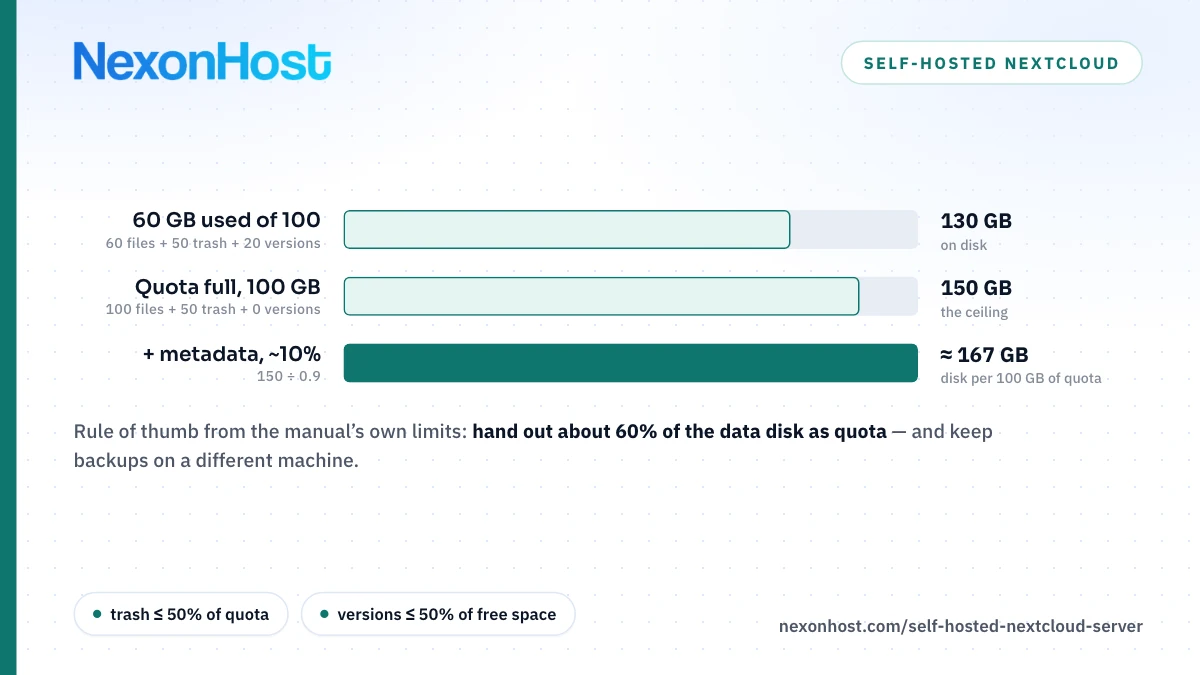
- Trash does not count against quotas; it is "set at 50% of quota", and deleted-file aging is 30 days by default.
- Versions do not count against quotas either; the Versions app "never uses more than 50% of the user's currently available free space".
- Metadata (thumbnails, temporary files, encryption keys) "takes up about 10% of disk space".
Take a 100 GB quota with 60 GB of files. Trash can add 50 GB and versions 0.5 × (100 − 60) = 20 GB: 60 + 50 + 20 = 130 GB. At a full 100 GB, versions fall to zero but trash still adds 50: 150 GB, the ceiling. With metadata at about 10% of the disk, that is 150 ÷ 0.9 ≈ 167 GB of disk per 100 GB of quota.
Turned around: hand out quota totalling about 60% of the data disk (0.9 ÷ 1.5 = 0.6), less what the OS and database take. It is a ceiling, not a forecast; set quotas from day one. Backups are not in that figure: they should not be on that disk.
Which plan for which team
Prices a month as of 9 November 2026, excluding VAT; check the product pages for current figures. Examples use the 60% rule.
| Plan | Disk / RAM | Quota to hand out | Example |
|---|---|---|---|
| STG1, €39 | 200 GB SSD / 2 GB | 120 GB | a household, 4 × 30 GB |
| STG2, €79 | 400 GB SSD / 4 GB | 240 GB | 12 people × 20 GB |
| STG3, €159 | 800 GB SSD / 8 GB | 480 GB | 24 people × 20 GB |
| STG4, €249 | 1,600 GB SSD / 16 GB | 960 GB | 48 people × 20 GB |
| NEX2, €18 | 60 GB SSD / 4 GB | set by the bucket | files in S3 primary storage |
| Storage 2680v4, €499 | 8 × 10 TB HDD, RAID 10 = 40 TB / 256 GB | 24 TB | 240 people × 100 GB |
STG1 (1 vCPU, 2 GB) suits a few users without optional containers; each one you add takes RAM. STG2 is the sensible start for a small office.
NEX2 with object storage. Nextcloud can keep file contents in an S3-compatible bucket as primary storage, which keeps the VPS small; our self-hosted object storage guide covers the S3 side. The manual warns that enabling it on an existing instance "will make all existing files on the instance inaccessible", and that files can then only be read through Nextcloud, so back up bucket and database together. AIO's README does not document this layout; plan a manual install for it.
The storage server is for when data, not users, sets the size: 8 × 10 TB is 80 TB raw, 40 TB in RAID 10 (other levels in our RAID usable capacity guide). At 240 users you are past AIO's 100 free users, so read the Enterprise terms first. For the general split, see storage server vs storage VPS.
One server is one failure domain
On one VPS, the files, the database and any backup on the same disk share one fate. A deleted volume, a bad upgrade or a stolen admin password takes them together. RAID survives a dead disk, not a mistake.
AIO's Borg backup is incremental, compressed and encrypted, keeping 7 days of archives plus 4 weekly and 6 monthly by default. Point it at a remote Borg repository or, as the README also allows, an SSHFS-mounted backup directory, never the same disk; folders mounted with the external storage app are not included. For a manual install, the manual lists the config, data and theme folders, any custom apps and the database, taken with maintenance mode on.
Size the backup target at least as large as the live data until the first archive shows the real figure. Our offsite backup storage guide covers where that copy lives and the 3-2-1 rule. Then restore it once on a spare VPS.
TLS, ports and the login page
Serve Nextcloud over HTTPS only. AIO gets the certificate itself and documents running behind an existing reverse proxy; a manual install needs Certbot or your proxy. Reach the AIO admin interface on port 8080 through an SSH tunnel or a firewall rule limited to your own IP, expose 443 (and 3478 TCP and UDP for Talk), and add Fail2Ban, which AIO documents. Our new server security checklist covers SSH, firewall and updates for the host.
What self-hosting does not solve
You are the admin. Nobody else applies the maintenance release, reads the logs or answers the user who lost a folder. AIO automates updates, not the reading of release notes. If nobody will own those jobs, pay someone who will; our managed vs unmanaged hosting guide sets out who owns what.
Where to start
For most small teams, self-hosted Nextcloud starts on an STG2 storage VPS: 2 vCPU, 4 GB of RAM, 400 GB of SSD and 8 TB of traffic for €79 a month. The store shows no region choice for STG plans, so ask sales where yours will run if residency matters. Pick Ubuntu 24.04, install Docker and AIO yourself, set quotas, and send backups off the box: backup storage is an SFTP target, 1 TB for €5 a month extra. If files will live in S3, a NEX2 Linux VPS at €18 a month is enough, in Germany, the Netherlands or Romania. Past a few terabytes, a storage server in Bucharest from €499 a month is quoted and built, not instant. Every plan includes 100 Gbps Layer 4 DDoS protection, which does not filter HTTP-level abuse of your login page. Start on a one-month term and load real data before committing to a year.
Sources
- Nextcloud server repository, COPYING — GNU Affero General Public License version 3, retrieved 9 November 2026
- Nextcloud server releases — v35.0.0 (15 September 2026), v35.0.2 (15 October 2026), retrieved 9 November 2026
- Nextcloud 35 Administration Manual — System requirements: OS, PHP, databases, web servers, RAM per process, retrieved 9 November 2026
- Nextcloud 35 Administration Manual — Maintenance and release schedule, one year per major version, retrieved 9 November 2026
- Nextcloud 35 Administration Manual — Memory caching, APCu and Redis, retrieved 9 November 2026
- Nextcloud 35 Administration Manual — Background jobs, AJAX default, cron every 5 minutes, retrieved 9 November 2026
- Nextcloud 35 Administration Manual — User management, quotas, trash at 50% of quota, metadata about 10%, retrieved 9 November 2026
- Nextcloud 35 Administration Manual — File versions, 50% of available free space, retrieved 9 November 2026
- Nextcloud 35 Administration Manual — Deleted items (trash bin), 30-day default, retrieved 9 November 2026
- Nextcloud 35 Administration Manual — Backup, what to keep and maintenance mode, retrieved 9 November 2026
- Nextcloud 35 Administration Manual — Object storage as primary storage, retrieved 9 November 2026
- Nextcloud All-in-One README — components, ports, 512 MB PHP limit, 100 free users, Borg backup and retention, update policy, SSHFS backup alternative; licence AGPL-3.0, retrieved 9 November 2026
- Nextcloud Enterprise — what the subscription includes, retrieved 9 November 2026
- Nextcloud pricing — Enterprise Standard, Premium, Ultimate per user a year, from 100 users, retrieved 9 November 2026
- Ubuntu packages — php metapackage in Ubuntu 24.04 (noble) is PHP 8.3, retrieved 9 November 2026
- NexonHost store — STG and NEX VPS plans (NEX region option; none on STG), storage server build, backup add-on, DDoS tiers; backup storage page (SFTP), retrieved 9 November 2026
- Computed — 2,048 ÷ 512 = 4 processes; 100 × €71.29 = €7,129; 0.5 × (100 − 60) = 20 GB; 60 + 50 + 20 = 130 GB; 100 + 50 = 150 GB; 150 ÷ 0.9 ≈ 167 GB; 0.9 ÷ 1.5 = 0.6; 200/400/800/1,600 GB × 0.6 = 120/240/480/960 GB; 8 × 10 TB = 80 TB raw, 40 TB in RAID 10, × 0.6 = 24 TB; 24 TB ÷ 100 GB = 240 users