A storage server sold as 16× 20 TB has 320 TB of disks in it, and you will never store 320 TB on it. Redundancy takes a share, the operating system counts in different units from the drive maker, the filesystem wants headroom, and the RAID level decides how long you are exposed when a disk dies. This guide works through the storage server RAID arithmetic for three real configurations, so you can size against the usable storage capacity you will actually get. For how each level works, see RAID levels explained.
Raw terabytes against usable terabytes
The example is NexonHost's Storage 2680v4: two Xeon E5-2680 v4 processors, 256 GB of RAM, two 500 GB SSDs for the operating system and eight 10 TB SATA hard disks for data, at €499 a month. The data bays take up to sixteen disks of 10, 16 or 20 TB. Twelve 16 TB disks add €180 (€679 a month in total); sixteen 20 TB disks add €680 (€1,179 a month).
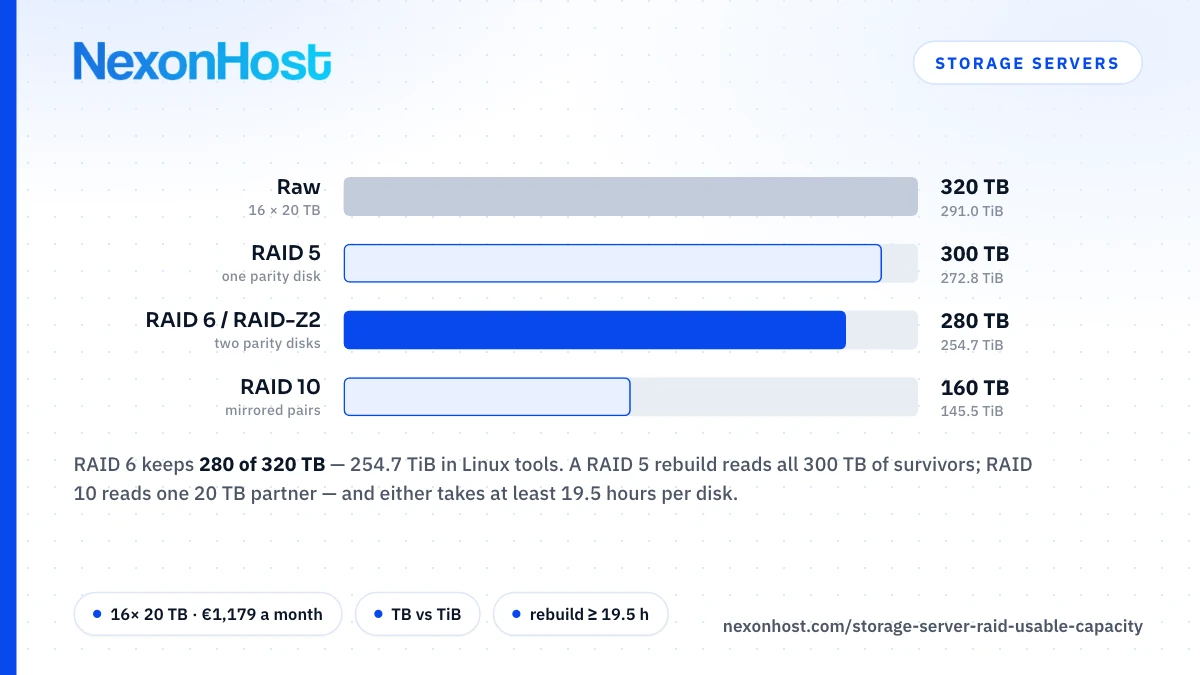
RAID 10 keeps half the disks, RAID 5 gives one disk to parity and RAID 6 gives two. OpenZFS gives RAID-Z the same rule, about (N − P) × X for N disks of size X with P parity, so RAID-Z2 sizes like RAID 6. Sixteen 20 TB disks in RAID 6 give (16 − 2) × 20 = 280 TB.
| Layout | 8× 10 TB | 12× 16 TB | 16× 20 TB |
|---|---|---|---|
| Price a month | €499 | €679 | €1,179 |
| Raw | 80 TB | 192 TB | 320 TB |
| RAID 10 | 40 TB (36.4 TiB) | 96 TB (87.3 TiB) | 160 TB (145.5 TiB) |
| RAID 5 | 70 TB (63.7 TiB) | 176 TB (160.1 TiB) | 300 TB (272.8 TiB) |
| RAID 6 / RAID-Z2 | 60 TB (54.6 TiB) | 160 TB (145.5 TiB) | 280 TB (254.7 TiB) |
| RAID 6, € per usable TB | €8.32 | €4.24 | €4.21 |
Across the table, bigger arrays cost less per usable terabyte: two parity disks are a smaller share of sixteen than of eight. More, smaller disks can also beat fewer, bigger ones: 12× 16 TB and 10× 20 TB (€879 a month) both give 160 TB in RAID 6, €200 a month apart. Sixteen 16 TB disks (€829 a month) give 224 TB, or €3.70 per usable TB a month, the lowest of any disk option on this build.
Why the operating system shows less
Drive makers count in decimal: Seagate's datasheets define a terabyte as one trillion bytes. Linux tools mostly count in binary. df -h and lsblk print sizes in powers of 1024, so their "T" is a tebibyte (TiB), 2⁴⁰ bytes, and one TB is 10¹² ÷ 2⁴⁰ = 0.909 TiB. That is why lsblk shows a 20 TB disk as about 18.2T and the 280 TB array as about 254.7T. Nothing is missing; the unit changed. df -H counts in powers of 1000 if you want the numbers to match the invoice.
Then the filesystem takes its share:
- ZFS. The OpenZFS tuning guide says to keep pool free space above 10%; below it, allocation gets slower and IOPS fall. On the two-group RAID-Z2 layout below (218.3 TiB), plan on about 196 TiB of data.
- ext4. mke2fs reserves 5% of blocks for root by default, 12.7 TiB of the 254.7 TiB array. On a data-only volume, set it lower with
-m.
The rebuild window is a floor, not a forecast
With md or a hardware controller, a replacement disk is written end to end, no faster than its sustained transfer rate, so capacity ÷ sustained rate is the shortest a rebuild can take. (ZFS resilvers by walking the block tree, so its time depends on the data stored.) We cannot promise which disk model a server ships with (ask before ordering, or check with smartctl -i), so these use Seagate's figures for its enterprise SATA Exos drives:
| Disk (reference model) | Max sustained rate | Rebuild floor |
|---|---|---|
| 10 TB, Exos X16 ST10000NM001G | 245 MB/s | 10,000,000 MB ÷ 245 ≈ 11.3 h |
| 16 TB, Exos X16 ST16000NM001G | 261 MB/s | 16,000,000 MB ÷ 261 ≈ 17.0 h |
| 20 TB, Exos X20 ST20000NM007D | 285 MB/s | 20,000,000 MB ÷ 285 ≈ 19.5 h |
Real rebuilds take longer. The datasheet rate is a maximum, quoted at the outer diameter of the platters: the best case, not the average. Linux md caps recovery at 200,000 KiB/s per device by default, about 205 MB/s, so a 20 TB disk takes at least 20,000,000 MB ÷ 204.8 ≈ 27 h even on an idle array, and longer while the array serves traffic. On 20 TB disks, a rebuild of more than a day is the normal case.
Why RAID 5 on big disks is a bad bet
The same datasheets give a second number: at most one unreadable sector per 10¹⁵ bits read. A RAID 5 rebuild reads every surviving disk in full. Multiply the bytes read by eight, then divide by 10¹⁵:
| RAID 5 array | Read to rebuild one disk | Sectors allowed at the spec ceiling |
|---|---|---|
| 8× 10 TB | 7 × 10 = 70 TB | 0.56 |
| 12× 16 TB | 11 × 16 = 176 TB | 1.41 |
| 16× 20 TB | 15 × 20 = 300 TB | 2.40 |
That is a vendor ceiling, not a measured error rate, so it does not predict that your rebuild will hit a bad sector. It does mean that on the two larger arrays the specification allows more than one unreadable sector per rebuild. A degraded RAID 5 array has no redundancy left to recover that sector from. Linux md lets the bulk of the rebuild complete and records the block on its bad-block list, but reads of it then fail: that data is gone. Hardware controllers differ, so ask what yours does.
RAID 6 still has a second parity to rebuild from. RAID 10 copies the failed disk back from its mirror: 20 TB read rather than 300 TB, or 0.16 at the same ceiling.
RAID 50, a common compromise on controllers, splits sixteen disks into two RAID 5 groups. It matches RAID 6's 280 TB, but a rebuild reads 7 × 20 = 140 TB (1.12 at the ceiling) with no redundancy left in that group: RAID 6 capacity with RAID 5 exposure.
RAID 6 vs RAID 10 on a storage server
RAID 6, or RAID-Z2, suits archives, backup targets and media libraries: the most capacity that survives two disk failures, 280 TB of 320. Every rebuild reads every disk, and the md manual warns that RAID 6 is very slow with two disks failed.
RAID 10 suits random I/O and the shortest exposure. You keep half the capacity, 160 TB of 320, but a rebuild is a straight copy from the mirror. It survives one failure per mirror pair; losing both disks of a pair loses the array.
Neither changes the disks. Seagate rates the 16 TB Exos X16 at 170 random 4K read IOPS (queue depth 16), and no RAID level turns spinning disks into a database volume.
Getting RAID 6 or RAID-Z2 on this build
The storage servers page lists RAID 0, 1, 5 and 10, and the storage order form has no RAID selector at all, so RAID 6 is something you ask for or build yourself. Three ways to get it:
- Ask before you order. Contact us and name the layout you want on the data disks.
- mdadm. Linux software RAID supports RAID 6, using N + 2 disks for N disks of data. The operating system lives on the SSD pair, so with the data disks left unconfigured you can build the array after delivery.
- ZFS. OpenZFS says hardware RAID controllers should not be used with ZFS, single-disk RAID 0 volumes included, so ask for the data disks on a plain HBA. It also recommends 3 to 9 disks per RAID-Z group; for sixteen disks that means two groups of eight and two more parity disks: (16 − 4) × 20 = 240 TB, about 218.3 TiB.
RAID is not a backup
RAID keeps the server running through a disk failure. It does nothing when someone deletes the wrong directory, ransomware encrypts the array or a filesystem is corrupted, because every copy sits in the same box. Offsite backup storage for servers covers the copy that lives elsewhere.
Check the recovery time. Bringing 280 TB back over the included 1 Gbps port takes at least 280 × 10¹² bytes ÷ 125 MB/s = 2,240,000 seconds, nearly 26 days. A 10 Gbps port (+€450 a month) cuts that floor to about 2.6 days.
NexonHost's backup storage is €5 per TB a month, and backup storage cost vs object storage compares it with metered object storage. Back up what you cannot recreate, not necessarily all 280 TB.
Who should not buy a storage server
- Small datasets. Under a couple of terabytes, a storage VPS on SSD costs less; Storage server or storage VPS? draws the line.
- Hot databases. Random I/O wants NVMe. The AMD EPYC 9254 dedicated server is €449 a month with 2× 1 TB NVMe in RAID 1, and 10× 1.92 TB of extra NVMe is +€340 a month.
- Anyone who needs the data outside Romania. Every storage build is in Bucharest; for other cities, a Xeon dedicated server with 6× 8 TB SSD (48 TB raw, +€798 a month) is the nearest fit.
Pricing and ordering
This storage dedicated server starts at €499 a month with 8× 10 TB, a 1 Gbps unmetered port and 10 Gbps / 1 Mpps of Layer 4 DDoS protection included; 16× 20 TB is €1,179 a month, and 512 GB of RAM is +€250 a month. The storage servers page links to the priced order form. Choose the storage server RAID layout from the table before you order, then plan your data against the TiB figure, less filesystem headroom.
Prices as of 19 October 2026, in EUR excluding VAT; check the product page.
Sources
- Seagate Exos X20 data sheet (DS2080) — SATA ST20000NM007D: 20 TB, 285 MB/s max sustained transfer rate (OD), 1 sector per 10E15 bits read, TB defined as one trillion bytes, retrieved 19 October 2026
- Seagate Exos X16 SATA product manual, Rev. F — ST16000NM001G 261 MB/s and ST10000NM001G 245 MB/s max sustained transfer rate (OD); nonrecoverable read errors 1 per 10¹⁵ bits read, max, retrieved 19 October 2026
- Seagate Exos X16 data sheet (DS2011) — 16 TB: random 4K QD16 read/write 170/440 IOPS; TB defined as one trillion bytes, retrieved 19 October 2026
- NIST — Prefixes for binary multiples: 1 TiB = 2⁴⁰ bytes, retrieved 19 October 2026
- df(1) manual —
-hprints sizes in powers of 1024,-Hin powers of 1000, retrieved 19 October 2026 - lsblk(8) manual — sizes shown in powers of 1024 by default, retrieved 19 October 2026
- mke2fs(8) manual — blocks reserved for the super-user default to 5%, retrieved 19 October 2026
- md(4) manual — recovery slowed during other activity; speed_limit_max default 200,000 KiB/s per device; bad-block list lets the bulk of a recovery complete; RAID 6 needs N + 2 drives and is very slow with two failed, retrieved 19 October 2026
- OpenZFS documentation, RAIDZ — capacity of about (N − P) × X; 3 to 9 disks per group recommended, retrieved 19 October 2026
- OpenZFS documentation, Workload Tuning — keep pool free space above 10%, retrieved 19 October 2026
- OpenZFS documentation, Hardware — hardware RAID controllers, including single-drive RAID 0, should not be used with ZFS; use an HBA, retrieved 19 October 2026
- OpenZFS documentation, dRAID — a RAID-Z (healing) resilver scans the block tree, a random read workload, retrieved 19 October 2026
- NexonHost store configurator, Storage 2680v4, Xeon and EPYC 9254 dedicated builds: base prices, disk options, port and RAM add-ons, included DDoS tier (the storage form has no RAID selector). Retrieved 19 October 2026.
- Computed: usable TB = data disks × disk size; TiB = TB × 10¹² ÷ 2⁴⁰; € per usable TB = monthly price ÷ RAID 6 TB; rebuild floor = disk MB ÷ MB/s (md cap: 200,000 KiB/s = 204.8 MB/s); sectors at the ceiling = TB read × 8 × 10¹² ÷ 10¹⁵; restore floor = bytes ÷ (port bits per second ÷ 8).