A managed Kubernetes service hides a lot of machinery: the provider runs the control plane, creates load balancers and attaches network disks to your pods. Move a Kubernetes bare metal cluster onto rented dedicated servers and each of those jobs becomes yours. This guide lists what you must bring, what the official docs say each piece needs, and what three servers cost. Whether bare metal beats the cloud on price is worked out in Bare Metal vs Cloud.
What a managed cluster does for you
Take Amazon EKS. It runs at least two API server instances and three etcd instances across three availability zones, replaces a failing control plane instance itself, and upgrades the control plane by rolling in new API servers. A type: LoadBalancer Service gets a cloud load balancer from the cloud-controller-manager; the EBS CSI driver turns a volume claim into a cloud disk.
On your own servers, the right-hand column is your work:
| Job | Managed cloud | On bare metal |
|---|---|---|
| Control plane and etcd | Run by the provider | Three servers you run |
type: LoadBalancer |
Cloud load balancer | MetalLB, kube-vip or k3s ServiceLB, plus IPs |
| Persistent volumes | Cloud block storage | Local volumes, Longhorn or Rook-Ceph |
| Node-to-node network | The provider's private network | Ask the host; encrypt the overlay |
| Upgrades | Control plane rolled for you | Control plane, nodes and OS |
The control plane: why three servers
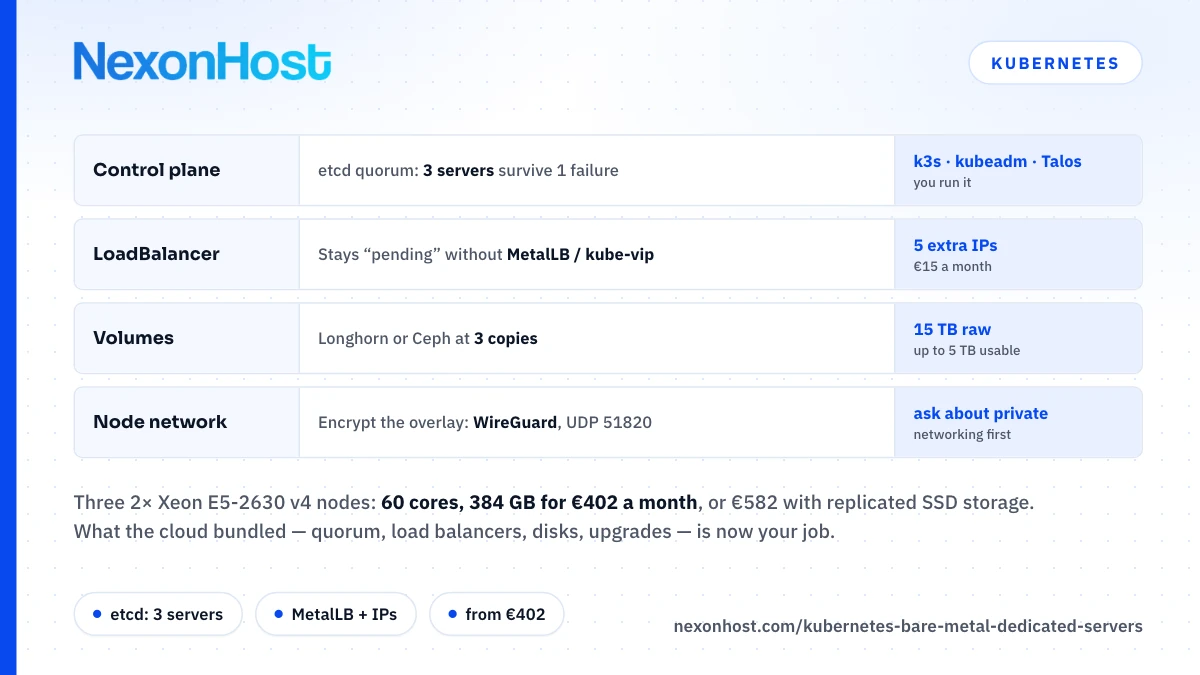
Kubernetes keeps all cluster state in etcd, and etcd accepts a write only when a majority of its members, a quorum, agree. From the etcd FAQ:
| etcd members | Majority needed | Failures tolerated |
|---|---|---|
| 1 | 1 | 0 |
| 2 | 2 | 0 |
| 3 | 2 | 1 |
| 4 | 3 | 1 |
| 5 | 3 | 2 |
Two members are no safer than one, and four no safer than three. That is why the kubeadm documentation says to run a minimum of three stacked control-plane nodes for high availability, and why k3s requires an odd number of server nodes for embedded etcd. Three servers is the floor for surviving the loss of a machine, and on a small cluster they can run your workloads too: k3s treats agent nodes as optional.
Keep the three in one city: the etcd FAQ warns that, with longer latencies, the default configuration may cause frequent elections or heartbeat timeouts. For geographic redundancy, run a second cluster and replicate, as Multi-Region Dedicated Servers explains. Back etcd up with etcdctl snapshot, and keep the snapshots off the cluster.
Load balancers and ingress
In MetalLB's words, Kubernetes does not offer an implementation of network load balancers for bare-metal clusters, and such Services stay "pending" indefinitely. Three common fixes:
- k3s ServiceLB ships with k3s and publishes each LoadBalancer Service on the nodes' own addresses through host ports. No extra IPs; you point DNS at the nodes and remove a dead one from DNS yourself.
- MetalLB hands out addresses from a pool you give it. In layer 2 mode one node answers for each address and takes all its traffic; another takes over if it fails. BGP mode needs a router that speaks BGP.
- kube-vip provides a virtual IP for the control plane as well as for Services, by ARP or BGP.
MetalLB and kube-vip need spare IPv4 addresses: NexonHost sells up to five extra at €3 each a month, or a /24 for €250 a month plus €100 setup. Layer 2 failover also needs an address that can move between servers. Whether it can at NexonHost, or whether your nodes can announce addresses over BGP, is not documented: ask first. If not, ServiceLB plus DNS is the honest fallback.
Behind the load balancer you still need an HTTP controller; k3s ships Traefik. Ingress NGINX is retired: maintenance ended in March 2026, with no security fixes since, and its repository is archived. The Ingress API is frozen, and Kubernetes recommends Gateway API instead.
Persistent storage
Three options, in rising order of effort:
- Local persistent volumes. Fast and simple, but the Kubernetes docs are blunt: if the node becomes unhealthy, the volume is inaccessible and the pod cannot run. Fine for databases that replicate themselves; k3s bundles a local-path provisioner of this kind.
- Longhorn replicates each volume across nodes. Its minimum recommended hardware is 3 nodes with 4 vCPUs and 4 GiB each, and it recommends a dedicated disk, not the root disk, in production. At the default 3 replicas usable capacity is at most a third of raw, and Longhorn keeps 25% of each disk free by default.
- Rook-Ceph runs Ceph inside the cluster. It needs raw disks with no filesystem, its sample replicated pool needs OSDs on 3 different nodes, and its monitors keep quorum the way etcd does. On-the-wire encryption is off by default.
Replicated storage writes over the network, and Longhorn's best practices ask for 10 Gbps between nodes and a dedicated storage network. Without one, replication shares each server's 1 Gbps port with everything else: at most 125 MB/s (1,000 Mbps ÷ 8).
Networking between the servers
In a managed cloud the nodes share a private network. NexonHost's dedicated pages mention a private VLAN, but it is not in the online configurator, so ask support whether your servers can share one and what it costs. Until you have it in writing, assume node-to-node traffic crosses the public interface, which kubeadm's prerequisites accept.
Public is workable if you encrypt and firewall it. k3s's default flannel backend is VXLAN, and its docs warn that the VXLAN port should not be exposed to the world. Start the servers with --flannel-backend=wireguard-native and pod traffic between nodes is encrypted with WireGuard on UDP 51820. Open TCP 2379–2380 (etcd), TCP 10250 (kubelet), UDP 51820 and, for MetalLB layer 2, TCP and UDP 7946 to the other nodes only, and TCP 6443 (API server) to the nodes and your admin addresses.
Pick a distribution and an upgrade path
Three documented routes, with minimums per control-plane node:
| Route | Minimum | What it includes |
|---|---|---|
| k3s | 2 cores, 2 GB RAM | SQLite or embedded etcd, flannel, Traefik, ServiceLB, local-path storage |
| kubeadm | 2 CPUs, 2 GB RAM | Kubernetes; you add networking, load balancing, storage |
| Talos Linux | 2 cores, 2 GiB RAM, 10 GiB disk | An immutable OS managed through one API |
The smallest NexonHost build, 20 cores and 128 GB, clears them many times over. k3s is the shortest path from an Ubuntu or Debian install, both on the checkout menu. Talos is not on that menu, so ask support how to boot your own image first.
Upgrades are the cost people forget. Kubernetes maintains the three newest minor releases, currently 1.37, 1.36 and 1.35, with about a year of patch support each; 1.34 reaches end of life on 27 October 2026. Those end-of-life dates fall four months apart, and the API server may not skip a minor version, so staying supported means about three control-plane upgrades a year (12 ÷ 4). k3s automates them with system-upgrade-controller, which, its docs warn, will not stop a plan that skips a version. Kernel patches come on top: drain, patch, reboot, next node.
What a three-server cluster costs
Each server includes a 1 Gbps port (listed as unmetered on Xeon, as guaranteed on EPYC), one IPv4 address and 40 Gbps / 4 Mpps of Layer 4 DDoS protection.
| A month | 3× 2× Xeon E5-2630 v4 | 3× EPYC 9254 |
|---|---|---|
| Servers | 3 × €129 = €387 | 3 × €449 = €1,347 |
| Cores / threads / RAM | 60 / 120 / 384 GB DDR4 | 72 / 144 / 384 GB DDR5 |
| Storage disks | 6× 1 TB SSD: 3 × €60 = €180 | +10× 1 TB NVMe: 3 × €220 = €660 |
| Five extra IPv4 | €15 | €15 |
| Total | €582 | €2,022 |
| Delivery | Minutes | About two weeks |
The arithmetic: 3 × 20 = 60 cores, 3 × 24 = 72 cores, 3 × 128 GB = 384 GB. The six-disk option replaces the default 240 GB SSD, so if each Xeon node keeps one for the operating system, five go to storage: 3 × 5 TB = 15 TB raw, or at most 5 TB usable at three replicas. On EPYC the mirrored NVMe pair holds the operating system and the extra drives give 30 TB raw, at most 10 TB usable.
If your stateful data lives outside the cluster, skip the disks: the Xeon cluster is then €387 + €15 = €402 a month. Xeon vs EPYC compares the two processors by workload.
Who should not run Kubernetes on bare metal
- One small application. A container or two do not need a control plane. A Linux VPS from €9 a month, or one dedicated server running Docker, has far less to break.
- Teams without on-call. Someone must answer when etcd loses a member at 3 a.m. If nobody will, that is what a managed cluster's price buys.
- Spiky, short-lived load. Twenty extra nodes for an afternoon is what the cloud is for; a rented server is a monthly commitment.
- Teams that also want virtual machines. Run Proxmox on each server with the Kubernetes nodes as VMs; Proxmox Dedicated Server covers sizing, and virtualization servers quotes several identical nodes in one facility.
Kubernetes bare metal from NexonHost
For a Kubernetes bare metal cluster, start with bare metal servers for what single tenancy gives you, then pick three identical builds in one city from dedicated servers. Infrastructure as a service shows how servers, IP space and backup storage fit together. Before ordering, ask support two questions in writing: can the servers share a private network, and can an extra IPv4 address move between them? Then start on a one-month term, build it, and switch a node off on purpose.
Prices as of 19 October 2026, in EUR excluding VAT; check the product page.
Sources
- etcd FAQ — etcd v3.6 documentation: quorum is (n/2)+1; fault-tolerance table (1→0, 3→1, 5→2 failures); no more than seven members; cross-region latency may cause frequent elections;
etcdctl snapshotbackups. Retrieved 19 October 2026. - Options for highly available topology — Kubernetes documentation: run a minimum of three stacked control plane nodes for an HA cluster. Retrieved 19 October 2026.
- Installing kubeadm — Kubernetes documentation: 2 GB RAM per machine, 2 CPUs for control plane machines, full connectivity over a public or private network. Retrieved 19 October 2026.
- Service, type: LoadBalancer — Kubernetes documentation: on supporting cloud providers the cloud-controller-manager configures an external load balancer. Retrieved 19 October 2026.
- Ingress — Kubernetes documentation: the Ingress API is frozen; the project recommends Gateway. Retrieved 19 October 2026.
- Ingress NGINX Retirement: What You Need to Know — Kubernetes blog: best-effort maintenance until March 2026, then no releases, bugfixes or security fixes. Retrieved 19 October 2026.
- kubernetes/ingress-nginx — GitHub repository: archived (read-only) on 24 March 2026. Retrieved 19 October 2026.
- Volumes, local — Kubernetes documentation: local volumes become inaccessible if the node is unhealthy. Retrieved 19 October 2026.
- Releases — Kubernetes: three maintained minor releases (1.37, 1.36, 1.35), about 1 year of patch support, end of life 2026-10-27 (1.34), 2027-02-28, 2027-06-28 and 2027-10-28. Retrieved 19 October 2026.
- Version Skew Policy — Kubernetes: kube-apiserver must not skip minor versions when upgrading. Retrieved 19 October 2026.
- K3s requirements — K3s documentation: server minimum 2 cores and 2 GB RAM; ports 6443, 2379–2380, 10250, UDP 8472 and 51820; VXLAN port should not be exposed to the world. Retrieved 19 October 2026.
- High Availability Embedded etcd — K3s documentation: odd number of server nodes, three or more; agent nodes optional. Retrieved 19 October 2026.
- K3s overview — K3s documentation: SQLite default datastore, etcd available; packaged Flannel, Traefik, ServiceLB and local-path-provisioner. Retrieved 19 October 2026.
- Basic Network Options — K3s documentation: default flannel backend is vxlan;
wireguard-nativeencrypts traffic. Retrieved 19 October 2026. - Networking Services — K3s documentation: ServiceLB uses host ports and node IPs; Traefik ingress; upstream LoadBalancer Services stay pending without an implementation. Retrieved 19 October 2026.
- Automated Upgrades — K3s documentation: system-upgrade-controller; it will not protect against skipping minor versions. Retrieved 19 October 2026.
- MetalLB — project home: no bare-metal LoadBalancer implementation in Kubernetes; Services stay pending; requires IPv4 addresses to hand out, BGP routers for BGP mode, and TCP/UDP 7946 between nodes in L2 mode. Retrieved 19 October 2026.
- MetalLB in layer 2 mode — MetalLB documentation: one node receives all traffic for a service IP; failover to another node. Retrieved 19 October 2026.
- kube-vip — project documentation: virtual IP and load balancer for the control plane and LoadBalancer Services, ARP or BGP. Retrieved 19 October 2026.
- Longhorn best practices — Longhorn documentation: minimum 3 nodes, 4 vCPUs and 4 GiB per node; 10 Gbps between nodes; dedicated disk; dedicated storage network. Retrieved 19 October 2026.
- Longhorn settings reference — Longhorn documentation: default replica count 3; Storage Minimal Available Percentage 25 by default. Retrieved 19 October 2026.
- Rook prerequisites — Rook Ceph documentation: raw devices or partitions with no filesystem. Retrieved 19 October 2026.
- Block Storage Overview — Rook Ceph documentation: sample pool needs OSDs on 3 different nodes, replicated size 3, failure domain host. Retrieved 19 October 2026.
- CephCluster CRD — Rook Ceph documentation: mon quorum needs a majority; on-the-wire encryption defaults to false. Retrieved 19 October 2026.
- System Requirements — Talos Linux v1.14 documentation: control plane minimum 2 GiB, 2 cores, 10 GiB disk. Retrieved 19 October 2026.
- What is Talos Linux? — Talos Linux v1.14 documentation: managed by a single declarative API, immutable file system. Retrieved 19 October 2026.
- Amazon EKS architecture — AWS documentation: at least two API server instances and three etcd instances across three Availability Zones; failing instances replaced. Retrieved 19 October 2026.
- Update existing cluster to new Kubernetes version — Amazon EKS documentation: rolling updates of API server instances. Retrieved 19 October 2026.
- Use Kubernetes volume storage with Amazon EBS — Amazon EKS documentation: the EBS CSI driver manages EBS volumes as persistent volumes. Retrieved 19 October 2026.
- NexonHost store configurator: 2× Xeon E5-2630 v4 €129 and EPYC 9254 €449 a month with a 1 Gbps port; 6× 1 TB SSD +€60; 10× 1 TB NVMe +€220; extra IPv4 €3 each up to five; /24 €250 a month + €100 setup; 40 Gbps / 4 Mpps Layer 4 DDoS included; Xeon provisioned in minutes, EPYC about two weeks. Retrieved 19 October 2026.
- Computed: 3 × €129 = €387; 3 × €449 = €1,347; €387 + €180 + €15 = €582; €1,347 + €660 + €15 = €2,022; 3 × 5 TB ÷ 3 = 5 TB; 3 × 10 TB ÷ 3 = 10 TB; 1,000 Mbps ÷ 8 = 125 MB/s; 12 months ÷ 4 = 3 upgrades a year.