A self-hosted PaaS gives you Heroku-style deploys (push to Git, get a running app with HTTPS) on a server you rent yourself, at a fixed monthly price. The four tools people compare are Coolify, Dokploy, CapRover and Kamal. They differ more than their landing pages suggest: one licence has a proprietary carve-out, the documented minimum servers range from 1 GiB of RAM to 2 cores and 2 GB, and one of the four is not a dashboard at all. This guide takes each project's own docs and repository as of 2 November 2026, sets out the work you take over from a managed platform, and sizes the server.
What a self-hosted PaaS actually is
All four do the same core job. They build your code into a container image (or pull one), start it under Docker, put a reverse proxy in front, and fetch a TLS certificate for your domain. Three of them (Coolify, Dokploy, CapRover) give you a web dashboard with one-click databases. Kamal is a command-line tool from 37signals, the company behind Basecamp: you write a config/deploy.yml, run kamal deploy from your laptop or CI, and it reaches your servers over SSH.
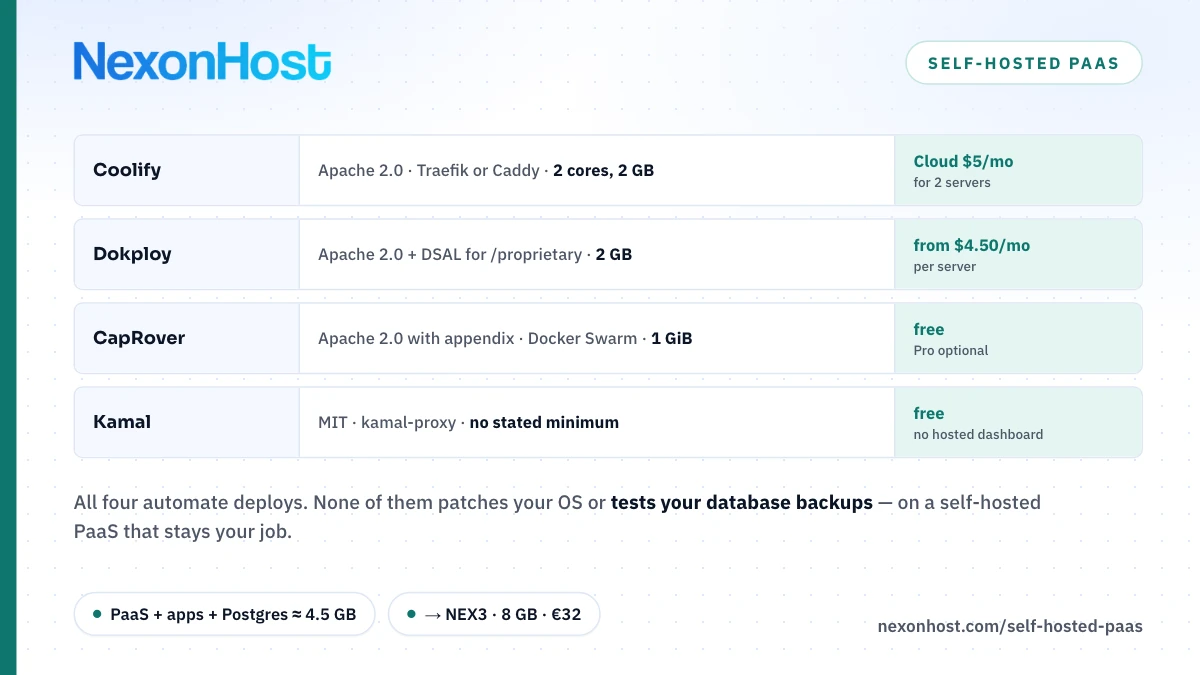
Coolify, Dokploy, CapRover and Kamal compared
Figures from each project's docs, licence file and GitHub releases, read 2 November 2026:
| Licence | Documented minimum | Under the hood | |
|---|---|---|---|
| Coolify v4.5.3 | Apache License 2.0 | 2 cores, 2 GB RAM, 10 GB disk | Docker, Traefik or Caddy |
| Dokploy v0.30.10 | Apache 2.0, plus DSAL 1.0 for /proprietary |
2 GB RAM, 30 GB disk | Docker Swarm, Traefik |
| CapRover v1.15.5 | Apache 2.0 with an appendix | 1 GiB RAM, 5 GiB disk | Docker Swarm, nginx, Let's Encrypt |
| Kamal v2.12.0 | MIT | none stated | Docker, kamal-proxy |
| Multi-server | Paid hosted version | |
|---|---|---|
| Coolify | Yes, servers added over SSH | Coolify Cloud: $5 a month (2 servers), +$3 per extra server |
| Dokploy | Remote servers and Swarm nodes | Hobby $4.50 a month per server; Startup from $15 a month (up to 3 servers) |
| CapRover | Swarm cluster, manager plus workers | CapRover Pro, optional; no price on a page we could read |
| Kamal | Yes, listed in deploy.yml |
None |
Coolify Cloud and Dokploy Cloud host only the dashboard. Coolify's docs say your applications, databases and data "remain on the servers you connect"; Dokploy's say the control plane is hosted by them and your apps run on servers you supply over SSH. Either way you still rent the servers, so the cloud fee is on top of hosting, not instead of it.
Licences: read the file, not the badge
Coolify and Kamal are the plain cases: Apache License 2.0 and MIT respectively. The other two have conditions worth a minute.
Dokploy's LICENSE.MD puts everything under Apache 2.0 except content in a /proprietary directory, which falls under the "Dokploy Source Available license (DSAL) version 1.0". That licence says the covered software may only be used in production with a valid commercial agreement from Dokploy, though you may copy and modify it for development and testing. On 2 November 2026 the repository's proprietary folders held features such as audit logs, custom roles, SSO sign-in and licence keys. The core deploy features sit outside them.
CapRover's LICENSE is Apache 2.0 with an appendix that "supersedes" it on conflict: paid features cannot be modified without a written agreement, nobody may redistribute another paid version, and modifications of free features should be distributed as free and open-source software. The terms describe CapRover Pro as "an optional service" on top of the free core.
This is a summary, not legal advice. If you plan to resell hosting built on one of these, read the licence and ask the project.
What you take on that a managed PaaS did for you
A managed PaaS runs the servers, the platform and usually the databases. Self-hosting moves all of that to your side:
| Job | Managed PaaS | Self-hosted PaaS |
|---|---|---|
| OS patches and reboots | Provider | You |
| Updating the PaaS itself | Provider | You |
| Database backups and restores | Usually provider | You configure and test them |
| Hardware or host failure | Provider moves you | Your apps are down |
| Dashboard security | Provider | You, including its port |
OS patching. The server underneath is a normal Linux box. NexonHost's IaaS page draws the line plainly: on a VPS, the operating system and patching are yours "or a management tier", and backups are yours. Our new server security checklist covers the first hour; don't skip it because a dashboard is installed.
The PaaS's own updates. Three of the four published a release in the two weeks before this was written (Kamal's latest, v2.12.0, is from June 2026). Each upgrade touches the proxy and the deploy logic, so read release notes before you click update.
Backups of the databases it deploys. Coolify schedules dumps for PostgreSQL, MySQL, MariaDB, MongoDB, ClickHouse and SQLite, writes them to /data/coolify/backups, and can upload copies to S3-compatible storage. Its own docs warn that a successful backup only proves a file was created, so test a restore. Dokploy backs up on a cron schedule to an S3 bucket. Kamal's docs say accessories (a database container, for example) are "not updated when you deploy" and say nothing about backing them up: that is yours entirely. NexonHost's IaaS page describes its backup storage as off-site capacity over SFTP and does not mention an S3 API, so either sync the dump folder to it over SFTP or point the tool at an S3-compatible store you run.
Dashboard exposure. Dokploy's UI listens on port 3000, and CapRover needs 3000 reachable during setup; CapRover's guide recommends restricting it afterwards. Firewall it to your own IPs.
One server is one point of failure
On a single server, the PaaS, every app and every database share one kernel, one disk and one power supply. When that host reboots for a kernel patch, everything is down until it comes back. Coolify's own README recommends one server for Coolify and one or more for your apps, which at least keeps a broken dashboard from taking production with it. It does not make the apps redundant.
CapRover's scaling docs say persistent apps are pinned to the node that holds their data, because local volumes are not shared between nodes. Kamal's docs say several servers need a load balancer in front, and its automatic Let's Encrypt certificates only work when you deploy to one server. Coolify describes its Docker Swarm support as "experimental and deprecated" and says it will be removed in Coolify v5.
If you need apps rescheduled automatically when a node dies, replicated storage and a three-member control plane, you have outgrown this category. That is Kubernetes, and what it costs on rented hardware is in Kubernetes on bare metal. For a dozen apps and a team of a few people, a self-hosted PaaS on one or two servers is usually the saner trade.
Sizing: control plane plus your apps
Start from the documented minimums, then add what your apps actually use. NexonHost VPS plans, prices as of 2 November 2026 (check the VPS page):
| Plan | vCPU / RAM / SSD | Monthly |
|---|---|---|
| NEX1 | 1 / 2 GB / 40 GB | €9 a month |
| NEX2 | 2 / 4 GB / 60 GB | €18 a month |
| NEX3 | 4 / 8 GB / 80 GB | €32 a month |
| NEX4 | 8 / 16 GB / 100 GB | €64 a month |
NEX1 is below Coolify's 2-core minimum, and it matches Dokploy's 2 GB floor exactly, leaving nothing for apps. It suits CapRover (1 GiB) or a Kamal target running one small app.
A worked estimate, with the assumptions labelled: assume the PaaS and the OS take the full documented 2 GB minimum; three small web apps at about 512 MB each take 1.5 GB; one PostgreSQL instance gets 1 GB. That is 2 + 1.5 + 1 = 4.5 GB before builds, which happen on the same box unless you move them (Dokploy supports separate build servers). That overflows NEX2's 4 GB, so the honest answer is NEX3: 8 GB for €32 a month, with about 3.5 GB of headroom for builds and growth. Measure your own apps with docker stats before you trust these numbers.
On disk, Dokploy's 30 GB minimum leaves 50 GB of NEX3's 80 GB for images, volumes and local dumps.
When to move to a dedicated server
NEX4 tops out at 16 GB. The entry dedicated server, 2× Xeon E5-2630 v4 with 20 cores and 128 GB of RAM, is €129 a month including a 1 Gbps unmetered port. That is about 2× NEX4's price (129 ÷ 64 ≈ 2.0) for 8× the RAM (128 ÷ 16). Per gigabyte of RAM: €64 ÷ 16 = €4.00 on NEX4, €129 ÷ 128 ≈ €1.01 on the dedicated server.
Move when your apps need more than about 12 GB together, when builds start slowing production, or when you want the Coolify-style split of a control server plus a worker. A NEX2 for the dashboard (€18) plus one dedicated server for apps (€129) is €147 a month. For the same server priced against a cloud VM, see bare metal vs cloud cost.
A self-hosted PaaS on NexonHost
NexonHost does not sell a managed PaaS; its IaaS page names managed WordPress and e-commerce hosting as its closest offer. What it sells is the layer underneath: VPS in Germany, the Netherlands and Romania, and dedicated servers in 12 cities, with root access, so you install Coolify, Dokploy, CapRover or Kamal yourself. Ubuntu 24.04 and Debian 12 are on the VPS OS menu, and both are on Dokploy's tested list. Every VPS and dedicated server includes 100 Gbps Layer 4 DDoS protection; HTTP-layer filtering is not part of it.
For a first self-hosted PaaS: NEX3 at €32 a month, started on a one-month term, firewall on port 3000, and a restore test before the first real customer. If you would rather not patch the box yourself, VPS management tiers start at €20 a month; managed vs unmanaged hosting explains what that buys. Prices as of 2 November 2026; check the product page before you order.
Sources
- Coolify — installation docs (requirements, installer), retrieved 2 November 2026
- Coolify — GitHub repository, README and LICENSE (Apache License 2.0, v4.5.3), retrieved 2 November 2026
- Coolify — multiple servers docs (Traefik or Caddy), retrieved 2 November 2026
- Coolify — Docker Swarm docs (experimental and deprecated, removal in v5), retrieved 2 November 2026
- Coolify — database backups docs, retrieved 2 November 2026
- Coolify — Coolify Cloud docs, retrieved 2 November 2026
- Coolify — pricing page, retrieved 2 November 2026
- Dokploy — LICENSE.MD and LICENSE_PROPRIETARY.md (DSAL 1.0, v0.30.10), retrieved 2 November 2026
- Dokploy — installation docs (requirements, ports), retrieved 2 November 2026
- Dokploy — remote servers docs, retrieved 2 November 2026
- Dokploy — database backups docs, retrieved 2 November 2026
- Dokploy — Dokploy Cloud docs, retrieved 2 November 2026
- Dokploy — pricing page (monthly view), retrieved 2 November 2026
- CapRover — GitHub repository, LICENSE, README and TERMS_AND_CONDITIONS (v1.15.5), retrieved 2 November 2026
- CapRover — getting started (requirements, ports), retrieved 2 November 2026
- CapRover — scaling docs, retrieved 2 November 2026
- CapRover — multi-node cluster docs, retrieved 2 November 2026
- Kamal — installation docs, retrieved 2 November 2026
- Kamal — proxy docs (kamal-proxy, Let's Encrypt on one server), retrieved 2 November 2026
- Kamal — accessories docs, retrieved 2 November 2026
- Kamal — GitHub repository and MIT-LICENSE (v2.12.0), retrieved 2 November 2026