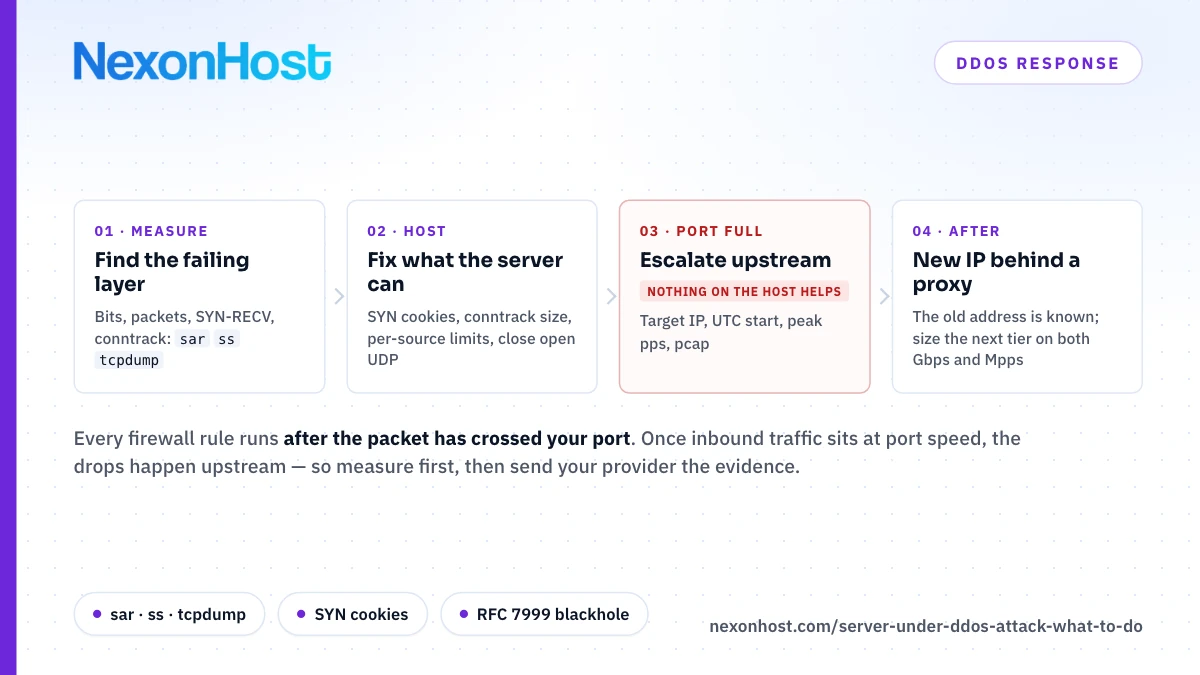
When a server under DDoS attack stops answering, the first hour decides two things: whether you fix the layer that is actually failing, and whether your provider gets the evidence it needs to filter upstream. This runbook is for a Linux server being hit now: the lookalikes, the commands that find the failing layer, what the host can fix, and what only your provider can.
In Cloudflare's DDoS threat report for the first half of 2026, 96.62% of the network-layer attacks it mitigated stayed under 500 Mbps, and 90.60% ended in under 10 minutes. So most attacks end before anyone can react, and most are small enough that the server's own settings matter. The ones that fill your port are a different problem.
Is it really an attack?
Three things look like an attack from inside the server and are not:
- A deploy. Trouble started the minute you shipped, errors rose and traffic did not. Roll back first.
- A crawler. One client walking the whole site, usually naming itself in the user-agent string.
- A real spike. Many distinct visitors loading pages, images and scripts like browsers, with a referrer you can trace.
The kernel documentation says the same of SYN flood warnings: they can come from legitimate load, and then the fix is tuning, not filtering. If none of those fit, match the symptom to the layer:
| Symptom | What it usually means | Where it gets fixed |
|---|---|---|
| Inbound traffic flat at port speed; even SSH lags | Volumetric flood, often UDP reflection (L3/L4) | Provider network only |
| Packets per second far above normal, bandwidth modest | Small-packet flood: SYN, ACK or UDP (L4) | Provider network; the host buys time |
| SYN-RECV count far above normal; "Possible SYN flooding" logged | SYN flood (L4) | Host (SYN cookies); provider for volume |
| "nf_conntrack: table full, dropping packet" | State-table exhaustion (L4) | Host (table size, notrack); provider |
| Outbound traffic at port speed from a UDP service | Your server is a reflector in someone else's attack | Host: close or firewall the service |
| Bandwidth normal, CPU or database pegged, one path dominating the log | HTTP flood (L7) | HTTP proxy with a challenge; app rate limits |
Measure first: the first ten minutes
Note the time in UTC with date -u before you change anything. Then:
sar -n DEV 1 5
Five one-second samples per interface (sysstat package). rxpck/s is packets per second; rxkB/s × 8 ÷ 1,000,000 is roughly Gbps. Flat at your port speed means the link is full.
ss -s
ss -Htn state syn-recv | wc -l
The socket summary, then the count of half-open TCP connections. Compare both with a quiet day.
sysctl net.netfilter.nf_conntrack_count net.netfilter.nf_conntrack_max
Tracked connections against the ceiling (conntrack -C gives the same count). Level means a full table; dmesg | grep -iE 'syn flood|table full' shows whether the kernel is sending SYN cookies or dropping packets.
tcpdump -i eth0 -c 20000 -w attack.pcap
A packet sample for your provider, on the interface sar showed. -c makes it stop by itself after 20,000 packets.
tail -n 50000 access.log | awk '{print $1}' | sort | uniq -c | sort -rn | head
The busiest client addresses in a combined-format log; $7 gives the busiest paths. Behind a proxy, $1 is the proxy unless you restore visitor addresses.
What you can fix on the server
SYN floods. sysctl net.ipv4.tcp_syncookies should print 1, the default: when a socket's SYN backlog overflows, the kernel answers with cookies, which encode the connection's state in the SYN-ACK instead of storing it. The documentation calls cookies a fallback that can degrade some services, so leave it at 1, not 2 (always on).
A full conntrack table. On a 64-bit kernel with more than 4 GB of RAM the default ceiling is 262,144 entries, on 8 GB and 512 GB alike. If the kernel logs "table full", raise nf_conntrack_max if memory allows, or exempt high-volume stateless traffic with a notrack rule in a raw-priority prerouting chain.
Connection floods from real addresses. Per-source limits help when sources are real, as with a botnet opening connections, and do nothing against spoofed packets. The nft manual's pattern, adapted to HTTPS:
nft add set ip filter flood \
  "{ type ipv4_addr; flags dynamic; timeout 10s; size 128000; }"
nft insert rule ip filter input tcp flags syn tcp dport 443 \
  add @flood { ip saddr limit rate over 20/second } drop
This assumes an ip filter table with an input chain; insert puts the rule ahead of your existing accept rules. Set the rate well above one real visitor's needs.
UDP services you did not mean to publish. ss -lunp lists listening UDP sockets and their processes. CISA lists amplification factors of 28 to 54 for DNS, 556.9 for NTP and 10,000 to 51,000 for memcached: an open service turns small spoofed requests into large replies at someone else, filling your port outbound. Bind to localhost or firewall them.
HTTP floods. If bandwidth is normal and the application is pegged, rate-limit per client. In nginx:
limit_req_zone $binary_remote_addr zone=one:10m rate=5r/s;
limit_req zone=one burst=10 nodelay;
The first line goes in http, the second in the attacked location; excess requests get a 503 by default. Behind a proxy, restore visitor addresses first (nginx's realip module), or the limit lands on the proxy and throttles everyone. A flood spread across many addresses, each under the limit, needs a proxy that challenges clients; see understanding Layer 7 DDoS attacks.
What you cannot fix on the server
Every rule above runs after the packet has crossed your port. If inbound traffic sits at port speed, packets are being dropped upstream of you, attack and customers alike. A 10 Gbps flood against a 1 Gbps port means at least nine-tenths of everything sent to you is discarded before your firewall sees it.
Packet rate fails the same way at lower bandwidth. A 1 Gbps link full of 64-byte frames carries about 1.49 million packets a second, 1,000,000,000 ÷ ((64 + 20) × 8) counting preamble and inter-frame gap, and each costs CPU time before a rule can drop it. Once sar shows either number pinned, stop tuning and escalate.
What to send your provider
One ticket, all of it:
- The target IP address, protocol and port.
- The start time in UTC, and whether it is still running.
- Peak bits and packets per second, next to your normal figures.
- The
attack.pcapsample. - The ports real users need, so filtering does not drop them.
- What you have already changed on the host.
CISA's amplification guidance also recommends keeping your upstream providers' emergency contacts to hand.
When the attack is bigger than the protection
Every protection tier has a ceiling, and a common industry tool beyond it is blackholing, or null routing. RFC 5635 describes destination-based remotely triggered blackholing: a discard route for the target, so every packet towards it, attack and legitimate, is dropped. That takes the target offline to limit collateral damage to everyone else. RFC 7999 defines the BLACKHOLE BGP community (65535:666) for asking neighbouring networks to do the same, typically for a single /32 (IPv4) or /128 (IPv6); each neighbour chooses whether to honour it.
Policies differ, so ask any provider:
- At what bandwidth or packet rate is my protection exceeded?
- What happens then: a null route, rate limiting, or a call?
- If a null route, for how long, who lifts it, and am I told?
- Is mitigation always in the path, or switched on when an attack is detected, and how fast?
RFC 5635 also notes a way round a blackhole: move the service to another address and update DNS, though it warns botnets often follow DNS.
After the attack: the address is known
The attacker has your IP address. If the site sits behind a proxy, an attack on the origin usually means the address leaked: close the leak, then move the origin to a new address firewalled to the proxy's ranges. How to hide your origin IP behind a DDoS proxy covers the common leaks. An extra IPv4 address on a NexonHost dedicated server is €3 a month.
Then install sysstat, tcpdump and conntrack, record what normal looks like, and keep this attack's numbers. The new server security checklist covers the baseline.
Sizing protection for the next one
Size from your own graphs, using both numbers. 10 Gbps of 64-byte frames is about 14.9 million packets a second. That is a tenth of a 100 Gbps allowance, but a Gbps figure says nothing about packets, so ask any provider, us included, what packet rate its filtering handles.
| What hit you | What covers it | Price a month |
|---|---|---|
| L3/L4 flood, dedicated server or VPS | 100 Gbps | Included |
| Bigger L3/L4 flood, dedicated server or VPS | 500 Gbps, 1 Tbps, 2 Tbps or 5 Tbps | €149 to €2,499 |
| Very large flood, plus Layer 7 filtering | 10 Tbps | €4,499 |
| HTTP flood, website | Protection proxy, Micro to Enterprise | €49 to €710 |
With 500 Gbps at €149, the €129 entry server comes to €278 a month (€129 + €149). The proxy's Micro plan carries 3 TB of clean traffic with 10 Gbps of Layer 4 absorption; Enterprise is unmetered, with 100 Gbps included and options to 1 Tbps.
Where NexonHost fits
A server under DDoS attack needs filtering capacity upstream of its port before the attack starts. Every NexonHost dedicated server, from €129 a month, includes 100 Gbps of Layer 3/4 network mitigation; Xeon builds are provisioned in minutes, EPYC builds in about two weeks. Every Linux VPS includes the same 100 Gbps, and both can be raised at checkout to as much as 10 Tbps. For HTTP floods, the website DDoS protection proxy adds WAF support and a web challenge from €49 a month; DDoS mitigation services lists the same plans and the mitigation nodes in Germany, the Netherlands and Romania.
What these do not solve: the included network protection does not stop Layer 7 floods (only the 10 Tbps tier adds Layer 7 filtering), and the proxy is built for HTTP(S) websites; for game servers or other UDP services, ask sales what fits before an attack, not during one. Start on a one-month term.
Prices are as of 12 October 2026 (DDoS tiers 23 October 2026), excluding VAT; check the product pages for current figures.
Sources
- Cloudflare DDoS Threat Report H1 2026 — Cloudflare's own report, published 11 August 2026, retrieved 12 October 2026: 96.62% of network-layer attacks under 500 Mbps; 90.60% ended in under 10 minutes.
- IP Sysctl — Linux kernel documentation, retrieved 12 October 2026:
tcp_syncookies(default 1, fallback on SYN backlog overflow that can degrade some services, 2 = unconditional) and the note on SYN flood warnings caused by legitimate load. - RFC 4987 — TCP SYN Flooding Attacks and Common Mitigations, IETF, retrieved 12 October 2026: section 3.6, SYN cookies encode connection state in the SYN-ACK sequence number instead of allocating it.
- Netfilter conntrack sysctl — Linux kernel documentation, retrieved 12 October 2026:
nf_conntrack_countandnf_conntrack_max. - nf_conntrack_core.c — Linux kernel source, retrieved 12 October 2026: default table of 262,144 entries on 64-bit systems with more than 4 GB of RAM; the "table full, dropping packet" message.
- tcp_input.c — Linux kernel source, retrieved 12 October 2026: the "Possible SYN flooding" message.
- ss(8) — iproute2 manual page, Debian, retrieved 12 October 2026:
-s,-H,-l,-u,-pand thesyn-recvstate filter. - sar(1) — sysstat manual page, Debian, retrieved 12 October 2026:
-n DEVfieldsrxpck/sandrxkB/s. - conntrack(8) — conntrack-tools manual page, Debian, retrieved 12 October 2026:
-Cshows the table counter. - tcpdump(1) — tcpdump manual page, retrieved 12 October 2026:
-i,-cand-w. - nft(8) — nftables manual page, Debian, retrieved 12 October 2026: the set statement example for per-source SYN limits,
insert rule, and thenotrackstatement at raw priority. - ngx_http_limit_req_module — nginx documentation, retrieved 12 October 2026:
limit_req_zone,limit_req, burst and the default 503 status. - UDP-Based Amplification Attacks (TA14-017A) — CISA alert, last revised 18 December 2019, retrieved 12 October 2026: amplification factors for DNS, NTP and memcached; disabling unwanted services; upstream emergency contacts.
- RFC 5635 — Remote Triggered Black Hole Filtering with uRPF, IETF, retrieved 12 October 2026: destination-based RTBH drops attack and legitimate traffic; moving the service to another address (section 3.1) and botnets configured to follow DNS (section 4).
- RFC 7999 — BLACKHOLE Community, IETF, retrieved 12 October 2026: BLACKHOLE = 0xFFFF029A (65535:666), typically /32 or /128, honoured at each operator's choice.
- NexonHost store, retrieved 12 October 2026: remote protection plans, extra IPv4 price, delivery times.
- NexonHost store, retrieved 23 October 2026: dedicated and VPS DDoS protection tiers and prices.
- Computed: 1,000,000,000 ÷ ((64 + 20) × 8) ≈ 1.49 million packets a second at 1 Gbps (14.88 million at 10 Gbps); (10 − 1) ÷ 10 = nine-tenths dropped; €129 + €149 = €278.