A retrieval-augmented generation (RAG) app is only as fast as the search behind it, and that search is mostly a memory problem. A self-hosted vector database keeps every embedding, plus a graph index over them, in RAM if it can; when it cannot, queries wait on the disk. So size it the way the projects' own docs do: count vectors, multiply by dimensions and bytes, add the index, then decide what can live on disk. Below: the formulas from the Qdrant and pgvector docs, five worked collections, and the server each fits.
The core arithmetic: vectors × dimensions × 4 bytes
An embedding is a list of numbers, stored by default as 32-bit floats, 4 bytes each. Qdrant's capacity-planning guide gives the raw size as:
dense_size = points × dimensions × bytes per dimension
OpenAI's embeddings guide lists 1,536 dimensions by default for text-embedding-3-small and 3,072 for text-embedding-3-large; the open BAAI/bge-m3 model card lists 1,024. So 10 million chunks embedded at 1,536 dimensions need 10,000,000 × 1,536 × 4 = 61.44 GB before any index. At 1,024 dimensions the same corpus is 10,000,000 × 1,024 × 4 = 40.96 GB.
GB here means 10⁹ bytes (Qdrant's examples print binary gigabytes, about 7% smaller). Replication multiplies everything: Qdrant's base unit is points × replication factor.
Add the HNSW graph and the rest
Approximate search uses an HNSW graph, a layered map of which vectors sit near which. Qdrant sizes it as:
hnsw_size = points × m × 2 × 4 bytes × 1.2
where m is the number of links per node (16 by default). That is 16 × 2 × 4 × 1.2 = 153.6 bytes per point, small next to a 6,144-byte vector (1,536 × 4). Qdrant's ID tracker adds 52 bytes per point, and the guide says to add about 20% headroom on top of the RAM total for the page cache, runtime overhead and optimizer work.
Payloads, the chunk text you hand back to the LLM, default to Qdrant's cold tier, so they cost disk rather than RAM: points × average payload × 1.5. For 10 million 1 KB chunks that is 10,000,000 × 1,024 × 1.5 = 15.36 GB of disk.
Weaviate's resource-planning page is blunter: memory = 2 × the footprint of all vectors, which also covers garbage collection during imports. For the 61.44 GB example that is 122.88 GB, against about 76 GB from Qdrant's formula below. Use your engine's own formula, then test on a sample.
Four engines, compared
You install and run all four. Licences from each project's GitHub repository, 9 November 2026:
| Engine | What it is | Licence | Memory guidance in its docs |
|---|---|---|---|
| pgvector | PostgreSQL extension | PostgreSQL License | 4 × dims + 8 bytes per vector; HNSW builds fastest inside maintenance_work_mem |
| Qdrant | Standalone server | Apache License 2.0 | Per-structure formula + ~20% headroom |
| Milvus | Lite, Standalone or Distributed | Apache License 2.0 | Standalone: 8 GB minimum, 16 GB recommended |
| Weaviate | Standalone server | BSD-3-Clause, except the wl directory (enterprise licence) |
2 × vector footprint |
Weaviate's LICENSE says code in its wl directory is "only available under a separate enterprise license", enabled by licence key. Milvus's Docker Compose install adds etcd and MinIO containers, and its docs highly recommend local NVMe SSDs for etcd. This is not legal advice: read each LICENSE file yourself.
pgvector: when the vectors live next to your data
If your documents already sit in PostgreSQL, pgvector avoids a second database. Its README gives per-row sizes (halfvec and binary_quantize() need version 0.7.0 or later):
vector: 4 × dimensions + 8 bytes. At 1,536 dimensions, 6,152 bytes; 10 million rows hold 61.52 GB of vector data.halfvec: 2 × dimensions + 8 bytes, so 3,080 bytes and 30.8 GB for the same rows. The README recommends it "for a smaller working set".bit, used bybinary_quantize()in an expression index: dimensions ÷ 8 + 8 = 200 bytes, about 31 times smaller (6,152 ÷ 200 = 30.8), with re-ranking by the original vectors for recall.
An HNSW index on vector supports up to 2,000 dimensions, so a 3,072-dimension column needs halfvec (up to 4,000) or binary quantization. And builds run "significantly faster" when the graph fits in maintenance_work_mem, but the README warns not to set it so high that it exhausts the server's memory. There is no index-size formula: build on 100,000 rows, read pg_relation_size, and scale. Splitting the rest of the RAM is in our database server sizing guide.
Quantization: the cheapest RAM you will find
Quantization keeps a compressed copy of each vector for searching. Qdrant's quantization guide lists scalar quantization (float32 to 8-bit integers) at 4 times smaller, binary quantization at up to 32 times smaller (one bit per dimension), and TurboQuant at 4 to 32 times (8 times at its default 4 bits). Applied to the 10-million, 1,536-dimension example: 61.44 ÷ 4 = 15.36 GB scalar, 61.44 ÷ 8 = 7.68 GB 4-bit TurboQuant, 61.44 ÷ 32 = 1.92 GB binary.
Qdrant can pin the quantized copy in RAM and leave the originals on disk (the "cold" tier, memory-mapped and cached by the OS on demand), reading originals only to rescore the top candidates. Qdrant says binary quantization is best suited to high-dimensional vectors and recommends it with rescoring, plus oversampling to tune speed against quality. Measure recall on your own data before you switch.
Disk: cold tiers want fast local SSDs
The cold tier is read from disk at query time. Qdrant asks for local SSDs with at least 50,000 IOPS for on-disk vectors, and gives a rule: store half as many vectors in RAM and search latency roughly doubles. Disk holds everything regardless of tier, plus 20% for the write-ahead log, snapshots and optimizer segments; restoring a snapshot needs twice the collection's current disk usage.
Matching collections to servers
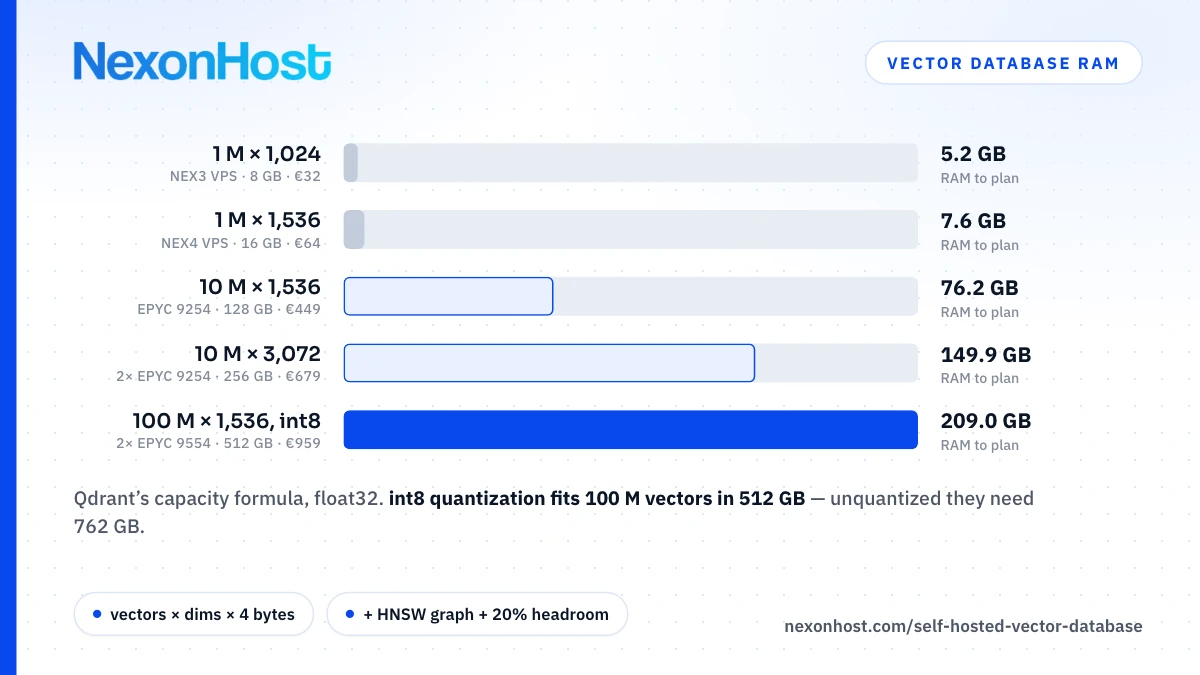
Qdrant's formula with defaults (float32, m = 16, payload cold) and 20% headroom, against Qdrant's rule of keeping each node under about 80% of physical RAM:
| Collection | RAM to plan | Fits (usable at 80%) | From / month |
|---|---|---|---|
| 1 M × 1,024 dims | 5.2 GB | NEX3 VPS, 8 GB (6.4 GB) | €32 |
| 1 M × 1,536 dims | 7.6 GB | NEX4 VPS, 16 GB (12.8 GB) | €64 |
| 10 M × 1,536 dims | 76.2 GB | EPYC 9254, 128 GB (102.4 GB) | €449 |
| 10 M × 3,072 dims | 149.9 GB | 2× EPYC 9254, 256 GB (204.8 GB) | €679 |
| 100 M × 1,536, scalar-quantized | 209.0 GB | 2× EPYC 9554, 512 GB (409.6 GB) | €959 |
Two rows worked through. 10 M × 1,536: 61.44 GB vectors + 1.536 GB graph (10,000,000 × 153.6 bytes) + 0.52 GB ID tracker = 63.50 GB, × 1.2 = 76.2 GB. 100 M × 1,536, scalar-quantized with originals cold: 153.6 GB quantized + 15.36 GB graph + 5.2 GB ID tracker = 174.16 GB, × 1.2 = 209.0 GB. Unquantized it needs (614.4 + 15.36 + 5.2) × 1.2 = 762.0 GB: only the 2× EPYC 9754 with 1,024 GB (819.2 GB usable) holds that, at €1,519 a month.
On disk, the 100-million row needs 614.4 GB originals + 153.6 GB quantized + 15.36 GB graph + 5.2 GB tracker + 153.6 GB of 1 KB payloads = 942.16 GB, × 1.2 = 1,130.6 GB. That build is listed with 2 TB NVMe; ask sales whether that is usable space or a mirrored pair before you count on it. Restoring a snapshot needs twice that collection's disk usage, about 1.9 TB (2 × 942.16 GB), so plan the restore target before you need it. Qdrant says a single node "typically tops out around 100 million vectors": this row is the edge of one-server territory.
The VPS rows assume the database has the machine to itself; add your app and an embedding model to the same 8 GB and the arithmetic breaks. Turning documents into vectors is a separate job; running models on processors alone is covered in CPU LLM inference. Cores matter mostly while indexing: Qdrant uses up to 16 indexing threads by default, so raise that on a 128-core build. Xeon vs EPYC by workload compares the processors.
What one server does not solve
- Recall. Approximate search trades exactness for speed. pgvector's README shows how to compare against exact search (
SET LOCAL enable_indexscan = off); raisingef_searchoref_constructionbuys recall with speed or build time. - Backups. A Qdrant snapshot is a tar archive of one collection on one node; full-storage snapshots suit single-node setups only. pgvector rides PostgreSQL's write-ahead log, so point-in-time recovery works as usual. Either way, the copy has to leave the server: see offsite backup storage.
- High availability. Qdrant's guide says production HA needs at least three nodes with a replication factor of two or more. That is three servers, not one bigger box. Multi-region dedicated servers covers where to put them.
Which server to buy for a self-hosted vector database
- Prototype or a million-odd chunks: a NEX3 or NEX4 Linux VPS at €32 or €64 a month, SSD storage, provisioned automatically. For a cold-tier collection, test first: NexonHost publishes no IOPS figure for VPS storage, and Qdrant asks for 50,000.
- Tens of millions of vectors in RAM: the EPYC 9254 at €449 a month, 128 GB DDR5 and 2× 1 TB NVMe in RAID 1, or the 2× EPYC 9254 at €679 with 256 GB.
- Around 100 million vectors, quantized: the 2× EPYC 9554 at €959 a month, 512 GB and 2 TB NVMe.
EPYC builds take about two weeks to deliver; all are on dedicated servers. Every server and VPS includes 100 Gbps Layer 4 DDoS protection. NexonHost provides the server; you install and run the self-hosted vector database. Start on a one-month term with a real sample. Prices as of 9 November 2026, EUR ex VAT, a month; the store preselects a 1 TB backup add-on at €5 a month extra. Check the product page.
Sources
- Qdrant docs — Capacity Planning: dense, HNSW, ID tracker and payload formulas, cached/cold/pinned defaults, 20% headroom, 80% node RAM, ~100 M vectors per node, 16 indexing threads, 50k IOPS, latency doubling, 2× disk for snapshot restore, 3-node HA, retrieved 9 November 2026
- Qdrant docs — Quantization: scalar 4×, binary up to 32×, TurboQuant 4–32× (8× at default 4 bits), rescoring and oversampling, tested models, retrieved 9 November 2026
- Qdrant docs — Storage: cached and cold memory tiers, memmap, retrieved 9 November 2026
- Qdrant docs — Snapshots: tar archive per collection per node, full-storage snapshots single-node only, retrieved 9 November 2026
- pgvector README — type sizes, 2,000/4,000-dimension HNSW limits, maintenance_work_mem, binary quantization, halfvec, 0.7.0 function versions, recall check, WAL replication, retrieved 9 November 2026
- pgvector LICENSE and META.json — PostgreSQL License, retrieved 9 November 2026
- Qdrant LICENSE — Apache License 2.0, retrieved 9 November 2026
- Milvus LICENSE — Apache License 2.0, retrieved 9 November 2026
- Weaviate LICENSE — BSD-3-Clause outside wl, enterprise licence inside, retrieved 9 November 2026
- Milvus docs — Requirements for Installing Milvus Standalone: 8 GB minimum, 16 GB recommended, etcd on NVMe, retrieved 9 November 2026
- Milvus docs — Overview of Milvus deployment options: Lite, Standalone, Distributed, retrieved 9 November 2026
- Weaviate docs — Resource planning: memory = 2 × vector footprint, retrieved 9 November 2026
- OpenAI — Embeddings guide: 1,536 dimensions (text-embedding-3-small), 3,072 (text-embedding-3-large), retrieved 9 November 2026
- Hugging Face — BAAI/bge-m3 model card: 1,024 dimensions, retrieved 9 November 2026
- NexonHost store configurator — VPS and dedicated builds, RAM, disks, prices, delivery times, backup add-on, retrieved 9 November 2026
- Computed — 10,000,000 × 1,536 × 4 = 61.44 GB; 10,000,000 × 1,024 × 4 = 40.96 GB; 16 × 2 × 4 × 1.2 = 153.6 B; 1,536 × 4 = 6,144 B; 10,000,000 × 1,024 × 1.5 = 15.36 GB; 2 × 61.44 = 122.88 GB; 4 × 1,536 + 8 = 6,152 B; 2 × 1,536 + 8 = 3,080 B; 1,536 ÷ 8 + 8 = 200 B; 6,152 ÷ 200 = 30.8; 61.44 ÷ 4 = 15.36 GB; 61.44 ÷ 8 = 7.68 GB; 61.44 ÷ 32 = 1.92 GB; (4.096 + 0.1536 + 0.052) × 1.2 = 5.2 GB; (6.144 + 0.1536 + 0.052) × 1.2 = 7.6 GB; (61.44 + 1.536 + 0.52) × 1.2 = 76.2 GB; (122.88 + 1.536 + 0.52) × 1.2 = 149.9 GB; (153.6 + 15.36 + 5.2) × 1.2 = 209.0 GB; (614.4 + 15.36 + 5.2) × 1.2 = 762.0 GB; (614.4 + 153.6 + 15.36 + 5.2 + 153.6) × 1.2 = 1,130.6 GB; 2 × 942.16 = 1,884.3 GB; 0.8 × 8 = 6.4; 0.8 × 16 = 12.8; 0.8 × 128 = 102.4; 0.8 × 256 = 204.8; 0.8 × 512 = 409.6; 0.8 × 1,024 = 819.2