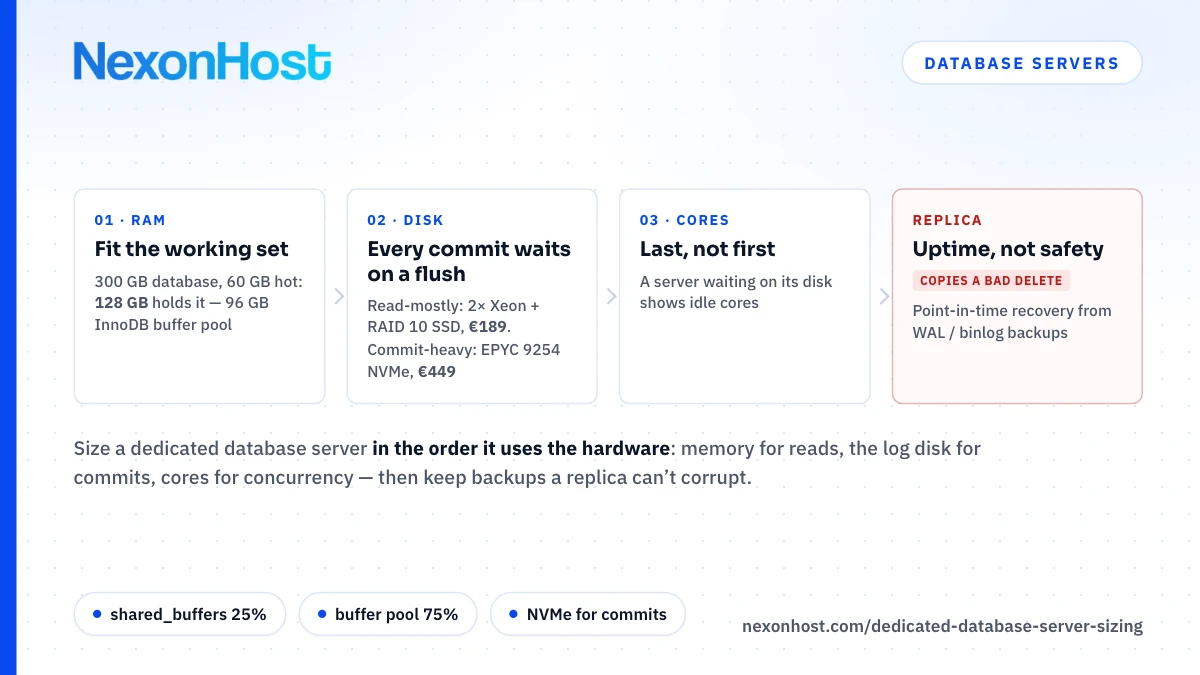
Server listings lead with the core count, but a dedicated database server should be sized the other way round. A database is fast when its data is already in memory, safe when every commit has reached a disk that survives a power cut, and only then limited by its processors. So size it in that order: the working set decides the RAM, the write pattern decides the disks, and cores come last. Below: the memory rules from the PostgreSQL and MySQL documentation, a 300 GB worked example, and the NexonHost builds that fit.
Step 1: size the RAM to the working set
The working set, or hot set, is the part of your tables and indexes that a busy hour touches: recent orders, active accounts, the indexes behind your busiest queries. If it fits in memory, most reads never reach the disk.
Both databases document how to split memory on a server that runs nothing else:
| Setting | What the official docs say |
|---|---|
PostgreSQL shared_buffers |
On a dedicated server with 1 GB of RAM or more, 25% of memory is a reasonable starting value; above 40% is unlikely to help |
PostgreSQL effective_cache_size |
The planner's estimate of shared buffers plus kernel cache; allocates nothing |
| MySQL 8.4 buffer pool | On dedicated servers, "up to 80% of physical memory is often assigned" to it |
MySQL 8.4 --innodb-dedicated-server |
With more than 4 GB detected, sets the buffer pool to 75% of memory |
PostgreSQL's advice tops out at 40% because the database also relies on the operating system's file cache. Leave room for query memory too: work_mem applies to each sort or hash operation, and the docs warn the total "could be many times the value of work_mem". 100 connections each running two sorts at 16 MB can claim 100 × 2 × 16 MB = 3.2 GB; make those hash operations and the default hash_mem_multiplier of 2.0 doubles it to 6.4 GB.
Measure the hot set rather than guess it. MySQL counts Innodb_buffer_pool_reads, reads InnoDB "could not satisfy from the buffer pool". PostgreSQL's pg_stat_database has blks_hit and blks_read, but a read served from the kernel cache still counts as a read, so check disk statistics too.
A worked example: 300 GB of data, 60 GB hot
Take a 300 GB database, indexes included, whose busy hours touch about 60 GB, on a 128 GB server.
- PostgreSQL: 25% of 128 GB = 32 GB of
shared_buffers. Reserve 16 GB for the operating system and query memory, and the kernel cache gets roughly 128 − 32 − 16 = 80 GB. The 60 GB hot set fits across the two, so seteffective_cache_sizeto about 32 + 80 = 112 GB. - MySQL:
--innodb-dedicated-serversets 0.75 × 128 = 96 GB of buffer pool: the 60 GB hot set plus 96 − 60 = 36 GB for growth.
So 128 GB is enough, and the decision moves to the disks. A 150 GB hot set would need a 256 GB build (0.75 × 256 = 192 GB of buffer pool). At 512 GB, a 0.75 × 512 = 384 GB buffer pool holds the whole 300 GB database.
Step 2: the disk decides how fast you commit
RAM fixes reads, not writes: a commit must reach permanent storage before the database confirms it. In PostgreSQL, "only the WAL file needs to be flushed to disk to guarantee that a transaction is committed", and with the default synchronous_commit = on every commit waits for that flush. MySQL's default innodb_flush_log_at_trx_commit = 1 flushes the redo log at every commit, which the manual calls "required for full ACID compliance".
So for orders, payments or job queues, each commit waits on the flush time of the drive holding the log, though one flush can cover several concurrent commits. That is where NVMe against SATA SSD matters. NVMe is the standard interface for SSDs attached over PCI Express; the Xeon builds' SSDs use SATA. We quote no latency figure: it depends on the exact drive, and we have not measured these. Run PostgreSQL's pg_test_fsync, which reports average sync time in microseconds.
Two warnings. The PostgreSQL docs note that many SSDs have volatile write-back caches and many "do not honor cache flush commands by default", so a fast fsync is only good news if the drive protects its cache against power loss: ask for the drive model and read its datasheet. And switching the flush off is a trade, not a tune: at 0 or 2, MySQL says "up to one second of transactions can be lost in a crash", and that once-per-second flushing is not guaranteed. PostgreSQL's synchronous_commit = off can lose recent commits too, without leaving the database inconsistent.
Step 3: cores come last
PostgreSQL uses a "process per user" model, one backend process per connection, so cores largely set how many queries run at once. Per-core speed sets how long one query takes, and that is where the EPYC and Xeon generations differ widely; Xeon vs EPYC by workload compares them from the spec sheets. A server waiting on its disk shows idle cores, and more of them will not help.
Matching the builds
| Build | RAM | Database disks (usable) | From / month |
|---|---|---|---|
| 2× Xeon E5-2630 v4, 20 cores | 128 GB DDR4 | 6× 1 TB SATA SSD, RAID 10: 3 TB | €189 |
| 2× Xeon E5-2699 v4, 44 cores | 256 GB DDR4 | 240 GB SSD, up to 6 disks | €425 |
| AMD EPYC 9254, 24 cores | 128 GB DDR5 | 2× 1 TB NVMe, RAID 1: 1 TB | €449 |
| 2× AMD EPYC 9554, 128 cores | 512 GB DDR5 | 2 TB NVMe, up to 24 disks | €959 |
The first row is the €129 build plus six 1 TB SSDs for €60; RAID 10 keeps half, (6 ÷ 2) × 1 TB = 3 TB. The EPYC 9254 takes ten extra 1.92 TB NVMe drives for €340 (€789 a month in total). Its order form has no RAID option, so mirror them yourself (mdadm RAID 10 or ZFS mirrors) or ask: in pairs they give (10 ÷ 2) × 1.92 = 9.6 TB.
In the worked example, both 128 GB builds hold the 60 GB hot set, so step 2 decides. A read-mostly catalogue, CMS or reporting database runs well on the Xeon at €189; a commit-heavy one belongs on the EPYC 9254's NVMe at €449. Xeon builds provision in minutes; EPYC builds take about two weeks.
A naming trap in database server hosting: if you searched for a "database storage server", NexonHost's storage servers are not it. They are built for capacity: the Xeon storage build pairs two OS SSDs with eight 10 TB SATA hard disks, in Bucharest only. A home for a database's backups, not its hot data.
Replicas buy uptime, not safety
A replica on a second server covers a hardware failure and can take reads. PostgreSQL streams WAL to the standby as it is generated, and a hot standby answers read-only queries. MySQL replication "is asynchronous by default", and its manual lists reads and backups on replicas as uses. Two EPYC 9254 servers cost 2 × €449 = €898 a month.
A replica is not a backup: it copies a mistaken DELETE within moments. For replicas in other cities, multi-region dedicated servers sets out synchronous against asynchronous replication by distance.
Backups with point-in-time recovery
Both databases can restore to a chosen moment, not just last night. PostgreSQL pairs a base backup with a continuous WAL archive, making it possible "to restore the database to its state at any time since your base backup was taken"; a pg_dump cannot be part of that chain. MySQL restores a full backup, then replays the binary logs written since; binary logging is on by default in 8.4.
CISA's 3-2-1 rule asks for three copies, on two kinds of media, one off-site; offsite backup storage covers the design. Size it from your measured daily log volume: two 300 GB base backups plus 14 days of logs at, say, 15 GB a day is 2 × 300 + 14 × 15 = 810 GB, inside the 1 TB tier of backup storage at €5 a month. Then time a restore.
When not to buy a dedicated database server
When it is small. A 40 GB database with a 6 GB hot set fits a NEX4 Linux VPS: 8 vCPU, 16 GB of RAM and 100 GB of SSD for €64 a month, giving 25% × 16 = 4 GB of shared_buffers plus kernel cache, or a 0.75 × 16 = 12 GB buffer pool. The NEX3 (4 vCPU, 8 GB, 80 GB SSD, €32) suits smaller ones.
When nobody will run it. Patching, monitoring, backups, failover drills and restore tests are yours on an unmanaged server. If nobody owns that work, a managed database service may be the better buy. NexonHost sells capped hours of server help, not a database team on call: 24/7 ticket and email support is included, hands-on help is €99 a month for two hours, and fully managed is €599 a month for up to 12 hours. See infrastructure management and managed vs unmanaged hosting.
Where to start
A dedicated database server from NexonHost starts at €129 a month for the 2× Xeon E5-2630 v4 with 128 GB of RAM, or €189 with six 1 TB SSDs for RAID 10; NVMe starts at €449 a month with the AMD EPYC 9254. Every build is on dedicated servers, with a 1 Gbps port included. Start on a one-month term, restore a copy of production, and run pg_test_fsync and your real workload. Migrating a server without downtime covers the cutover.
Prices are as of 19 October 2026, in EUR excluding VAT; check the product page for current figures.
Sources
- PostgreSQL 18 documentation, 19.4 Resource Consumption — shared_buffers, work_mem, hash_mem_multiplier, retrieved 19 October 2026
- PostgreSQL 18 documentation, 19.7 Query Planning — effective_cache_size, retrieved 19 October 2026
- PostgreSQL 18 documentation, 19.5 Write Ahead Log — synchronous_commit, retrieved 19 October 2026
- PostgreSQL 18 documentation, 28.3 Write-Ahead Logging (WAL) — commit needs only the WAL flush, retrieved 19 October 2026
- PostgreSQL 18 documentation, 28.1 Reliability — drive write-back caches and flush commands, retrieved 19 October 2026
- PostgreSQL 18 documentation, pg_test_fsync — sync time per method, retrieved 19 October 2026
- PostgreSQL 18 documentation, 51.2 How Connections Are Established — process per user, retrieved 19 October 2026
- PostgreSQL 18 documentation, 27.2 The Cumulative Statistics System — blks_hit and blks_read, retrieved 19 October 2026
- PostgreSQL 18 documentation, 25.3 Continuous Archiving and Point-in-Time Recovery, retrieved 19 October 2026
- PostgreSQL 18 documentation, 26.2 Log-Shipping Standby Servers — streaming replication, retrieved 19 October 2026
- PostgreSQL 18 documentation, 26.4 Hot Standby — read-only queries on a standby, retrieved 19 October 2026
- MySQL 8.4 Reference Manual, 17.5.1 Buffer Pool — up to 80% of memory on dedicated servers, retrieved 19 October 2026
- MySQL 8.4 Reference Manual, 17.8.12 Enabling Automatic InnoDB Configuration for a Dedicated MySQL Server — buffer pool 0.75 × memory above 4 GB, retrieved 19 October 2026
- MySQL 8.4 Reference Manual, InnoDB Startup Options and System Variables — innodb_flush_log_at_trx_commit, retrieved 19 October 2026
- MySQL 8.4 Reference Manual, Server Status Variables — Innodb_buffer_pool_reads and read_requests, retrieved 19 October 2026
- MySQL 8.4 Reference Manual, 9.5.1 Point-in-Time Recovery Using Binary Log, retrieved 19 October 2026
- MySQL 8.4 Reference Manual, Chapter 19 Replication — asynchronous by default, uses of replicas, retrieved 19 October 2026
- AMD EPYC 9554 product page — system memory type DDR5, retrieved 19 October 2026
- NVM Express specifications — NVMe over PCI Express and other transports, retrieved 19 October 2026
- CISA — Back Up Business Data, the 3-2-1 rule, retrieved 19 October 2026
- NexonHost store configurator — dedicated builds, Xeon disk and RAID options, EPYC 9254 extra NVMe disks, delivery times, support tiers, backup storage and NEX VPS plans, retrieved 19 October 2026
- Computed — 0.25 × 128 = 32 GB; 128 − 32 − 16 = 80 GB; 32 + 80 = 112 GB; 0.75 × 128 = 96 GB; 96 − 60 = 36 GB; 0.25 × 16 = 4 GB; 0.75 × 16 = 12 GB; 0.75 × 256 = 192 GB; 0.75 × 512 = 384 GB; 100 × 2 × 16 MB = 3.2 GB; 2 × 3.2 = 6.4 GB; (6 ÷ 2) × 1 TB = 3 TB; (10 ÷ 2) × 1.92 = 9.6 TB; €129 + €60 = €189; €449 + €340 = €789; 2 × €449 = €898; 2 × 300 + 14 × 15 = 810 GB