Odoo server requirements come down to three numbers in Odoo's own documentation: how many worker processes your CPUs carry, how many users a worker serves, and how much RAM the workers need. Below, all three from the Odoo 20.0 docs (read 23 November 2026), with the arithmetic applied to four NexonHost plans, for a self-hosted Odoo install you run yourself.
Odoo 20.0 and what it runs on
Odoo 20.0 is the current major version. Odoo's support table lists it as released in September 2026, with standard support planned until September 2029; "Security updates are only provided during standard support".
| Component | Odoo 20.0 asks for | On Ubuntu 24.04 |
|---|---|---|
| Python | 3.12 or later | 3.12.3 in the archive |
| PostgreSQL | 16 or above | 16 in the archive |
| Packaged OS | deb: Ubuntu 24.04; rpm: Fedora 42 | Supported |
| PDF reports | wkhtmltopdf 0.12.6, installed by hand | Install it yourself |
Both minimums rose in 20.0, from Python 3.10 and PostgreSQL 13. That rules out Debian 12's own packages: its release notes list Python 3.11.2 and PostgreSQL 15. Ubuntu 24.04 meets both from its own archive and is on the NexonHost VPS and dedicated-server OS menus. Pick it.
Windows is discouraged for production: Odoo offers that package for testing or "single-user local instances", and the multi-processing server "is not available on Windows".
Odoo's three sizing rules
Production runs the multi-processing server, switched on by setting workers above 0; at 0 you get the multi-threaded server, "primarily used for development". The System configuration page then gives the method:
- Workers: "Rule of thumb : (#CPU * 2) + 1", and "Cron workers need CPU".
- Users: "1 worker ~= 6 concurrent users".
- Memory: 20% of requests are heavy and 80% light; a heavy worker is estimated at "around 1GB of RAM", a light one at "around 150MB". Needed RAM = workers × ((0.8 × 150) + (0.2 × 1,024)).
The bracket is the average per worker: 120 + 204.8 = 324.8 MB.
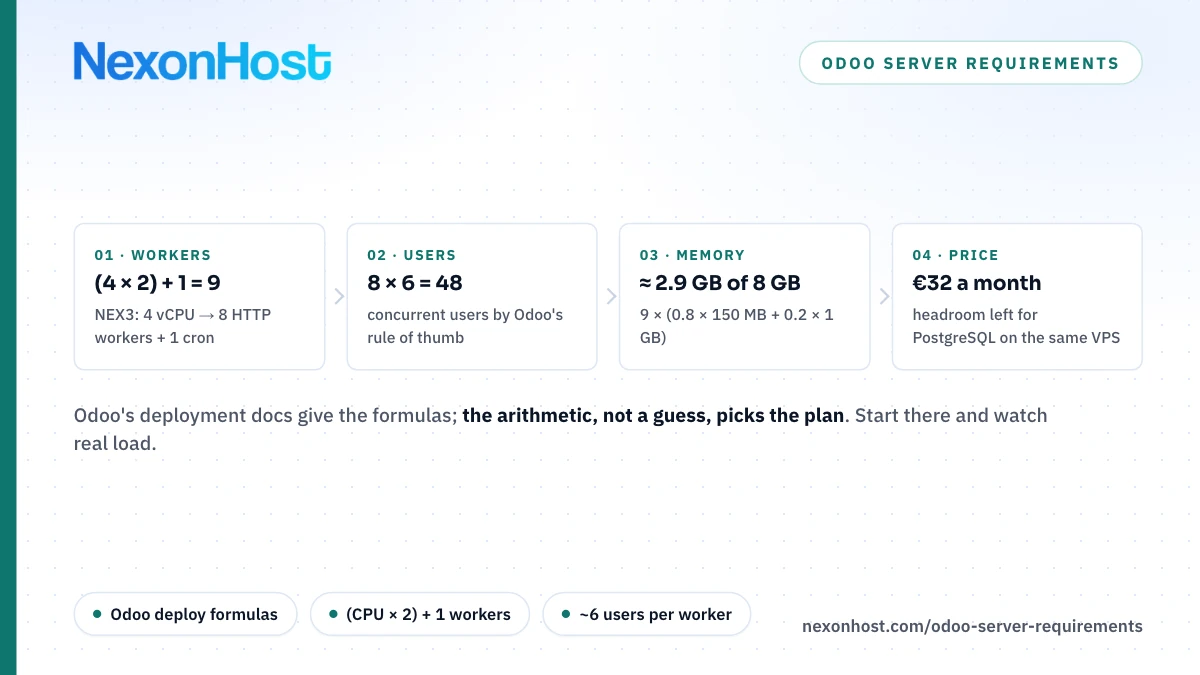
Odoo's worked example is a server "with 4 CPU, 8 Thread": (4 × 2) + 1 = 9 workers at most, run as 8 HTTP workers plus 1 for cron, and 9 × 324.8 = 2,923 MB, which the docs round to "~= 3GB RAM for Odoo". It plugs in the 4 CPUs, not the 8 threads, so this post counts cores. It also plans 60 concurrent users on 8 HTTP workers, 7.5 each, so treat 6 as a planning figure, not a limit. Concurrent means working at the same moment, not user accounts; your own logs tell you the ratio.
The arithmetic on four servers
Total processes from the CPU rule, one of them cron; users = HTTP workers × 6; RAM = processes × 324.8 MB. Prices a month as of 23 November 2026, excluding VAT; check the product pages.
| Plan | Workers by formula | ~Concurrent users | Odoo RAM by formula |
|---|---|---|---|
| NEX2 VPS: 2 vCPU, 4 GB, €18 | (2 × 2) + 1 = 5: 4 HTTP + 1 cron | 4 × 6 = 24 | 5 × 324.8 ≈ 1.6 GB of 4 |
| NEX3 VPS: 4 vCPU, 8 GB, €32 | (4 × 2) + 1 = 9: 8 + 1 | 8 × 6 = 48 | 9 × 324.8 ≈ 2.9 GB of 8 |
| NEX4 VPS: 8 vCPU, 16 GB, €64 | (8 × 2) + 1 = 17: 16 + 1 | 16 × 6 = 96 | 17 × 324.8 ≈ 5.4 GB of 16 |
| Xeon: 20 cores, 128 GB, €129 | (20 × 2) + 1 = 41: 40 + 1 | 40 × 6 = 240 | 41 × 324.8 ≈ 13 GB of 128 |
GB here is MB ÷ 1,024 (1,624, 2,923, 5,522 and 13,317 MB). That leaves 2.4, 5.1, 10.6 and 115 GB for the OS, PostgreSQL, nginx and the LiveChat worker.
Caveats: the VPS store cards say "CPU Core" but not whether that is a physical core, a thread, or dedicated, so read the VPS rows as ceilings; the Xeon, 2× E5-2630 v4, has 20 cores and 40 threads, counted as 20. And the RAM column is an average: if every worker hit a heavy request at once, NEX2 would need 5 × 1,024 = 5,120 MB, more than its 4 GB, and NEX3 and NEX4 would need 9 and 17 GB. The memory limits below cap each worker, not the total, so watch real usage.
Limits and cron workers in odoo.conf
Odoo's sample configuration for its 4-CPU example:
[options]
limit_memory_hard = 1677721600
limit_memory_soft = 629145600
limit_request = 8192
limit_time_cpu = 600
limit_time_real = 1200
max_cron_threads = 1
workers = 8
That is 1,677,721,600 ÷ 1,048,576 = 1,600 MiB hard and 600 MiB soft per worker. Over the soft limit a worker "is killed and recycled at the end of the current request"; over the hard limit it is "immediately killed". Both cap virtual memory, so they are a guard rail, not a RAM budget.
Set them. Unset, the defaults are 2,048 MiB soft, 2,560 MiB hard, 60 CPU seconds, 120 seconds real time, and two cron workers "in addition to the HTTP worker processes": on NEX2, 4 + 2 = 6 processes, 6 × 324.8 ≈ 1.9 GB.
Port 8072, the proxy and HTTPS
In multi-processing mode Odoo starts a LiveChat worker on the --gevent-port, 8072 by default, beside HTTP on 8069. You "must" put a proxy in front, send /websocket/ paths to that worker and run Odoo with --proxy-mode. Odoo "transmits authentication information in cleartext", so the proxy also terminates HTTPS.
The security list adds: set list_db = False once dbfilter matches one database, since the database manager "is not designed for use in production"; no demo data on public servers; a PostgreSQL user that is not a superuser; and fail2ban on Odoo's login log, whose sample jail bans an IP for 15 minutes after 10 failures in a minute. Our new server security checklist covers SSH, firewall and patching.
The docs also note provider DDoS mitigation is "often an optional service". Every NexonHost VPS and dedicated server includes 100 Gbps Layer 4 DDoS protection; it does not filter HTTP-level abuse such as a login flood, which is the jail's job.
Where PostgreSQL should live
Odoo's deb package defaults to PostgreSQL on the same host over a UNIX socket, which suits every row above; when the database's hot data outgrows the RAM Odoo leaves free, move it to its own server over an SSH tunnel or SSL, as the docs describe, and size it with our database server sizing guide.
Community or Enterprise on your own server
Community is open source: the LICENSE file in odoo/odoo's 20.0 branch is the LGPL v3. Enterprise is extra add-ons run on top of the Community code through addons-path. Its licence allows use only "with a valid Odoo Enterprise Subscription for the correct number of users", and its packages download only for "a paying on-premise customer or partner".
Odoo's pricing page puts the Standard plan on Odoo Online; to "Download Odoo Enterprise and host it yourself" you need the Custom plan, priced per user a month. A self-hosted Enterprise database must register with a subscription code (one database per code), keep the licence-checking code unmodified, and reach services.odoo.com on port 80 (or 443 with publisher_warranty_url) for a weekly check. Go over your paid users and the agreement says to notify Odoo at once and pay; the database gives you 30 days before it expires.
Odoo's editions comparison marks version upgrades and functional support as Enterprise-only, which matters most below.
Backups and the next major version
The docs: "Setup daily backups of your databases and filestore data, and copy them to a remote archiving server that is not accessible from the server itself." The database is a pg_dump (Odoo's upgrade form suggests pg_dump -F c). The filestore keeps attachments as files in Odoo's data_dir, outside PostgreSQL, so a dump alone does not bring your documents back. Skip the web database manager; it is "not designed to handle large databases".
Pushing to off-site backup storage gets the copy off the box, but the credentials sit on the Odoo server. To meet Odoo's stricter wording, have a second machine pull the files.
An update installs the latest revision of your version and "can be undone"; an upgrade to a new major version "is irreversible". Each major version is supported for three years, and on-premise "You can stay on the same version indefinitely, even if it is not recommended." With Enterprise, Odoo's upgrade service is included (on 23 November 2026 its upload form offered targets only up to 19.0), but custom modules must be ported first and the upgraded copy comes back without your filestore, which you merge in. On Community, the upgrade is your project. Rehearse on a copy, then cut over as in our migration runbook.
Which plan, and who runs it
For a small team, a NEX3 Linux VPS (4 vCPU, 8 GB, 80 GB SSD, €32 a month, in Germany, the Netherlands or Romania) runs Odoo, PostgreSQL and the proxy on one box with about 5 GB to spare by the formula. Past the NEX4's 96 users, the €129-a-month Xeon from our dedicated servers gives 41 workers and about 115 GB left for PostgreSQL and the OS. The store preselects a 1 TB backup add-on at €5 a month.
If you would rather not own patching and upgrades, add management: VPS tiers cost €20, €50 or €150 a month; on dedicated servers, 2 hours a month is €99 and fully managed (12 hours) €599. Ask whether a tier covers Odoo itself or only the OS; our managed vs unmanaged guide explains the split. Either way, the odoo server requirements above are where an Odoo VPS or dedicated box starts: start on a one-month term and measure real load.
Sources
- Odoo 20.0 documentation — Standard and extended support: 20.0 released September 2026, standard support to September 2029 (planned); security updates only during standard support, retrieved 23 November 2026
- Odoo 20.0 documentation — Source install: Python 3.12 or later, PostgreSQL 16 or above (changed in version 20); Enterprise repository is extra add-ons run via addons-path, retrieved 23 November 2026
- Odoo 20.0 documentation — Packaged installers: deb supports Ubuntu 24.04, rpm supports Fedora 42; wkhtmltopdf 0.12.6; Windows for testing or single-user local instances; Enterprise packages for paying on-premise customers; deb uses PostgreSQL on the same host, retrieved 23 November 2026
- odoo/odoo repository, 20.0 branch — release.py: version_info (20, 0, 0, FINAL), MIN_PY_VERSION (3, 12), MAX_PY_VERSION (3, 14), MIN_PG_VERSION 16, retrieved 23 November 2026
- Odoo 20.0 documentation — System configuration: builtin servers, worker number and memory size calculation, configuration sample, LiveChat and --proxy-mode, HTTPS, PostgreSQL over SSH tunnel or SSL, security list, fail2ban jail, database manager, daily backups of databases and filestore, retrieved 23 November 2026
- Odoo 20.0 documentation — Command-line interface: --workers, --limit-memory-soft/hard, --limit-time-cpu/real and their defaults, --max-cron-threads default 2, --gevent-port 8072, --http-port 8069, --data-dir (filestore), retrieved 23 November 2026
- Odoo 20.0 documentation — On-premise: database registration, one database per subscription, services.odoo.com port 80 or 443, weekly check, 30 days when over the user count, retrieved 23 November 2026
- Odoo 20.0 documentation — Bugfix updates: updating can be undone, upgrading is irreversible, retrieved 23 November 2026
- Odoo 20.0 documentation — Upgrade: three years of support per major version, stay on a version indefinitely on-premise, custom modules first, upgraded copy without filestore, free with Enterprise, retrieved 23 November 2026
- Odoo 20.0 documentation — Licenses: Odoo Enterprise Edition License v1.0 (the page's headings still read "Odoo 19"), retrieved 23 November 2026
- Odoo Enterprise Subscription Agreement (version 13, 2026-09-24) — Self-Hosting option, unmodified licence-verification code, notify Odoo immediately when users exceed the subscription, retrieved 23 November 2026
- odoo/odoo repository, 20.0 branch — LICENSE: GNU Lesser General Public License v3, retrieved 23 November 2026
- Odoo pricing — Standard plan on Odoo Online; Custom plan to download Odoo Enterprise and host it yourself; per user a month, retrieved 23 November 2026
- Odoo editions comparison — version upgrades and functional support marked Enterprise-only, retrieved 23 November 2026
- Odoo upgrade service — upload form, suggested dump format pg_dump -F c, targeted versions 19.0, 18.0, 17.0, retrieved 23 November 2026
- Ubuntu packages — python3 3.12.3 in Ubuntu 24.04 (noble), retrieved 23 November 2026
- Ubuntu packages — postgresql 16 in Ubuntu 24.04 (noble), retrieved 23 November 2026
- Debian 12 release notes — What's new: Python 3.11.2, PostgreSQL 15, retrieved 23 November 2026
- NexonHost store — NEX2/NEX3/NEX4 VPS and 2× E5-2630 v4 dedicated build (specs, prices, VPS cards reading "CPU Core", OS menus with Ubuntu 24.04 on both, VPS regions Romania/Netherlands/Germany, management tiers, 1 TB backup add-on preselected, 100 Gbps L4 DDoS protection), retrieved 23 November 2026
- Computed — per worker 0.8 × 150 + 0.2 × 1,024 = 120 + 204.8 = 324.8 MB; workers (2 × 2) + 1 = 5, (4 × 2) + 1 = 9, (8 × 2) + 1 = 17, (20 × 2) + 1 = 41; users 4 × 6 = 24, 8 × 6 = 48, 16 × 6 = 96, 40 × 6 = 240; RAM 5 × 324.8 = 1,624 MB, 9 × 324.8 = 2,923 MB, 17 × 324.8 = 5,522 MB, 41 × 324.8 = 13,317 MB, each ÷ 1,024 ≈ 1.6, 2.9, 5.4, 13 GB; left 4 − 1.6 = 2.4, 8 − 2.9 = 5.1, 16 − 5.4 = 10.6, 128 − 13 = 115 GB; all-heavy 5 × 1,024 = 5,120 MB, 9 × 1,024 = 9,216 MB, 17 × 1,024 = 17,408 MB; 60 ÷ 8 = 7.5; 1,677,721,600 ÷ 1,048,576 = 1,600 MiB, 629,145,600 ÷ 1,048,576 = 600 MiB; default cron 4 + 2 = 6, 6 × 324.8 = 1,949 MB ≈ 1.9 GB