DDoS protection runs on one of two operating models, or a hybrid. Either your traffic always passes through the filter, or it flows normally until an attack is detected, then is diverted to a scrubbing centre that returns the clean part. Always-on DDoS protection can cost latency in peacetime; on-demand costs minutes once an attack starts. Here are both costs, from vendor documentation and RFCs, and which workload fits which.
Two models, one question: is the filter already in the path?
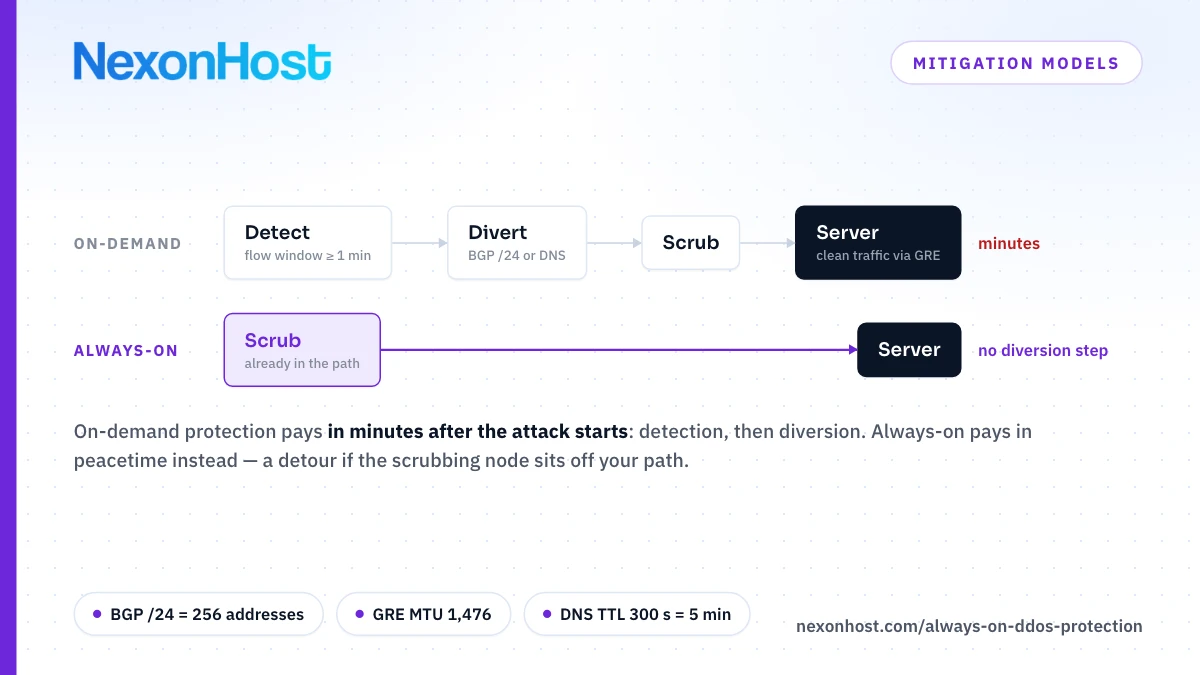
Cloudflare's Magic Transit reference architecture defines both. Always-on routes all traffic through the provider's network, even in peacetime, minimising the time from detection to mitigation. On-demand diverts it only during an active attack, and in many cases the customer has to call the provider to redirect it.
The label is not standardised. Azure DDoS Protection lists "always-on traffic monitoring", yet mitigates an IP only once traffic exceeds its policy threshold. AWS Shield inspects CloudFront and Route 53 traffic with a fully inline system, but evaluates traffic to regional resources, such as Elastic IPs and load balancers, every minute. So ask any provider: is my traffic always in the filtering path, or only always watched, and what starts the filtering?
How on-demand diversion works
RFC 8811, the IETF's architecture for DDoS Open Threat Signaling (DOTS), names BGP and DNS as the common ways to steer traffic to an upstream mitigator, which scrubs it and forwards the rest.
- BGP. The scrubbing provider announces your prefix. The unit is usually a /24, 2^(32 − 24) = 256 addresses, because RFC 7454 records that IPv4 prefixes longer than /24 are generally neither announced nor accepted; Cloudflare's Magic Transit onboards nothing smaller. You divert at least 256 addresses at a time, from a /24 you control.
- DNS. You repoint the name at the scrubbing provider. Only clients that look it up again move.
- The way back. After a BGP diversion, clean traffic returns over a GRE or IPsec tunnel or a private interconnect.
GRE has a byte cost. Cloudflare's MTU guide adds a 20-byte IPv4 header to the 4-byte GRE header that RFC 2784 defines: 24 bytes, so on a 1,500-byte path the tunnel MTU drops to 1,476 bytes and the TCP MSS from 1,460 to 1,476 − 20 − 20 = 1,436. That is 24 ÷ 1,500 = 1.6% of every full-size packet. The guide warns that packets ignoring the overhead are dropped or fragmented and recommends an MSS clamp; ask any provider what MTU its return tunnel carries.
The time cost of on-demand
On demand, time to mitigate is a chain of clocks.
| Step | What sets the time | What the vendor docs say |
|---|---|---|
| Detect | Flow data over a window | Cloudflare static flow-threshold rules: 1 minute minimum |
| Decide | A person, or a rule | In many cases a call to the provider; Cloudflare offers auto-advertisement |
| Divert by BGP | Announcement, propagation | Cloudflare: typically within minutes; ISP route refresh outside its control |
| Divert by DNS | Resolver caches | Up to the record's TTL |
| Return to normal | Withdrawal, convergence | Cloudflare's safe withdrawal: typically five to ten minutes |
Even fully automated, a static threshold rule waits at least a minute (Cloudflare advises at least two, to cut false alarms) before any announcement goes out, which then typically takes effect within minutes. A person in the loop adds the time to see the alert and act.
In Cloudflare's DDoS threat report for H1 2026, 90.60% of the network-layer attacks Cloudflare mitigated ended in under 10 minutes, and some record-breaking ones lasted 35 seconds. The report calls manual and on-demand mitigation too slow for that. Ask any vendor when its time-to-mitigate figure starts counting: on demand, the diversion has to finish first.
The latency cost of always-on
Always-on moves the cost into peacetime: if the scrubbing node is off the direct route, every packet pays the detour.
ITU-T G.114, the ITU's planning guide for transmission delay, budgets a provisional 5 µs per km of optical fibre. If your users and server share a city and the nearest scrubbing node is 500 km away, inbound traffic travels about 1,000 km further: 1,000 × 5 µs = 5 ms one way, before any processing. Fibre runs longer than a straight line, so that is a floor; a node near the path costs almost nothing. Measure the detour from where your users are, before and after the switch.
The DNS TTL cost of proxy-based protection
A website DDoS proxy is reached through DNS. RFC 1035 defines a record's TTL as the time, in seconds, a resolver may cache it. If resolvers honour it:
- TTL 300 s: up to 300 ÷ 60 = 5 minutes before every resolver asks again.
- TTL 3,600 s: up to 3,600 ÷ 60 = 60 minutes. Cutting it to 300 after the attack starts does nothing for resolvers already holding the old answer.
Pay that cost before the attack: point DNS at the proxy permanently and it is always-on for those hostnames, with the TTL a one-off at onboarding. The catch: attackers who know your origin's real address skip the proxy, which is why hiding your origin IP behind a DDoS proxy is the other half of the job.
Hybrid models
Hybrids keep detection always on, from flow data or an on-premises appliance that filters small floods inline, and divert big attacks to scrubbing automatically. Cloudflare's Network Flow watches flow data while Magic Transit is off and, with auto-advertisement, switches it on when a rule fires. RFC 8811 standardises the signal: a DOTS client asks an upstream DOTS server, which invokes mitigators. A host can run the same pattern inside its own network: Azure says that during mitigation, traffic to the protected resource "is redirected by the DDoS protection service".
Hybrid takes the person out of the chain, not the clocks. Peacetime traffic takes no detour; large attacks still pay the detection window plus the diversion. An attack spread thinly across a whole /24 is a detection problem of its own; see carpet bombing DDoS attacks.
Always-on vs on-demand DDoS models compared
| Model | Time to mitigate | Peacetime latency | Who it suits |
|---|---|---|---|
| Always-on, in path | No diversion step | The detour to the scrubbing node, if any | Real-time UDP; anything that can't be down for minutes |
| Always-on proxy (DNS) | No diversion step once DNS points at it | One proxy hop | Websites and APIs, HTTP(S) only |
| On-demand, manual | Detection window, a person, then BGP or DNS | None added | Own /24, own BGP, a 24/7 network team |
| Hybrid, auto-divert | Detection window, then the diversion | None added | Own /24, or a host that diverts for you |
Money splits the same way. Always-on is a monthly line, bundled with a server or sized by clean traffic, as NexonHost's proxy plans are (3 TB up to unmetered). On-demand DDoS protection adds prerequisites and people: a /24, BGP-capable routers, tunnel endpoints, and someone on call who has rehearsed the switch.
Who should choose which
- Game servers, VoIP and other real-time UDP: always-on, at the network where the server lives. Minutes of diversion are a dropped match or call, and a website (HTTP) proxy cannot carry that traffic. Ask the host which model it runs.
- Websites and APIs: a proxy, switched on before you need it. Pay the DNS TTL once, firewall the origin to the proxy's ranges, and it behaves as always-on.
- A corporate network with its own /24, BGP and a big pipe: on-demand can be acceptable. If your links absorb small floods and someone is always on call, you trade minutes of exposure for no peacetime detour.
- The same network without a 24/7 team: hybrid, so diversion does not wait for a person.
Plan the first hour with what to do when your server is under DDoS attack; DDoS protection server vs remote DDoS protection covers buying protection with the server or in front of it.
What NexonHost's own pages say
NexonHost's home page says all servers are protected by "always-on DDoS mitigation". Its DDoS protected dedicated server page says floods "are dropped upstream, before they reach your port", and "Protection is active from the moment the server is online; there is nothing to enable". The DDoS mitigation services page, which sells the remote protection plans, lists mitigation nodes in Germany, the Netherlands and Romania and describes "Traffic rerouted through European nodes" and "Automatic redirection during attacks".
None of these pages says whether traffic is always inline or diverted automatically on detection, the hybrid model above, and they publish no time-to-mitigate figure. Ask sales whether your traffic is always inline or automatically diverted, and how long either takes.
NexonHost describes the protection included with every DDoS protected dedicated server, from €129 a month, as always-on DDoS protection with nothing to switch on; every VPS, from €9 a month, includes the same 100 Gbps at Layer 4. Paid tiers, per server or VPS, run from 500 Gbps at €149 to 10 Tbps with Layer 7 at €4,499 a month. For websites, Remote DDoS Protection, a reverse proxy the home page calls "always on", starts at €49 a month for 3 TB of clean traffic and 10 Gbps of Layer 4 protection; it carries HTTP(S) only, not game, SIP or other UDP traffic. Prices as of 26 October 2026, in euros excluding VAT; check the product page, and start on a one-month term.
Sources
- Cloudflare — Magic Transit reference architecture (last updated 26 May 2026), retrieved 26 October 2026: always-on and on-demand definitions; in many cases the customer must call the provider to redirect traffic; GRE or IPsec tunnels and private interconnects for the return path; /24 as the smallest prefix most ISPs accept.
- Cloudflare — Magic Transit: advertise prefixes (last updated 6 October 2026), retrieved 26 October 2026: prefixes of at least 256 addresses (/24); changes typically take effect within minutes, ISP route refresh outside Cloudflare's control; safe BYOIP withdrawal waits typically five to ten minutes for BGP convergence.
- Cloudflare — Magic Transit on-demand (last updated 17 April 2026), retrieved 26 October 2026: enabling prefix advertisement during an attack and disabling it afterwards.
- Cloudflare — Network Flow: Magic Transit integration (last updated 7 May 2026), retrieved 26 October 2026: monitoring while Magic Transit is off; automatic or manual activation on detection.
- Cloudflare — Network Flow static threshold rules (last updated 17 April 2026), retrieved 26 October 2026: rule durations of 1, 5, 10, 15, 20, 30, 45 or 60 minutes; advice to set a duration of at least two minutes to reduce false positives.
- Cloudflare — Magic Transit MTU and MSS (last updated 24 August 2026), retrieved 26 October 2026: 24 bytes of GRE-over-IPv4 overhead; MTU 1,476; MSS 1,460 and 1,436; packets dropped or fragmented if the overhead is not accounted for; MSS clamp recommended.
- Cloudflare — DDoS Threat Report H1 2026 (published 11 August 2026), retrieved 26 October 2026: 90.60% of the network-layer attacks Cloudflare mitigated ended in under 10 minutes; record-breaking attacks of 35 seconds; the report's view that manual and on-demand mitigation are too slow.
- Microsoft — Azure DDoS Protection features (last updated 17 March 2026), retrieved 26 October 2026: always-on traffic monitoring; mitigation only when the policy threshold is exceeded; traffic redirected by the DDoS protection service during mitigation.
- AWS — Shield detection logic for infrastructure layer threats, retrieved 26 October 2026: fully inline mitigation for CloudFront and Route 53; traffic to regional resources evaluated every minute.
- RFC 8811 — DDoS Open Threat Signaling (DOTS) Architecture, IETF, August 2020, retrieved 26 October 2026: redirection to an upstream mitigator by BGP and DNS; DOTS clients requesting mitigation from DOTS servers, which invoke mitigators.
- RFC 7454 — BGP Operations and Security, IETF, February 2015, retrieved 26 October 2026: section 6.1.3, IPv4 prefixes longer than /24 generally neither announced nor accepted.
- RFC 2784 — Generic Routing Encapsulation (GRE), IETF, March 2000, retrieved 26 October 2026: section 2.1, the 4-byte GRE header (checksum optional).
- RFC 1035 — Domain Names: Implementation and Specification, IETF, November 1987, retrieved 26 October 2026: section 4.1.3, TTL as the time in seconds a record may be cached.
- ITU-T G.114 — One-way transmission time (05/2003), retrieved 26 October 2026: Table A.1 planning value of 5 µs/km for optical fibre cable systems (marked provisional).
- NexonHost site and store, retrieved 26 October 2026: home page ("always-on DDoS mitigation"; the reverse proxy "always on"); DDoS protected dedicated server page (upstream filtering, "nothing to enable", tiers); DDoS mitigation services page (Germany, the Netherlands, Romania; "Traffic rerouted through European nodes"; "Automatic redirection during attacks"); Remote DDoS Protection plans; dedicated, VPS and protection tier prices.
- Computed: 2^(32 − 24) = 256 addresses; 20 + 4 = 24 bytes; 1,500 − 24 = 1,476; 1,476 − 20 − 20 = 1,436; 24 ÷ 1,500 = 1.6%; 2 × 500 km = 1,000 km; 1,000 × 5 µs = 5 ms; 300 ÷ 60 = 5 minutes; 3,600 ÷ 60 = 60 minutes.