Windows VPS RDP access is usually the reason to rent a Windows server: a desktop in a data centre that you and your team can reach from anywhere. Three questions decide whether it goes well: is your use licensed, which plan carries your sessions, and how do you keep port 3389 from becoming someone else's way in? The answers come from Microsoft's documentation, CISA and NCSC guidance, and the NexonHost store on 12 October 2026.
Two admin sessions are covered; everyone else needs an RDS licence
On an image licensed by the hosting provider, Microsoft's Services Provider Use Rights let up to two users per running instance use Remote Desktop "for the sole purpose of testing, maintenance, and administration" without RDS licences. With your own licence, the Universal License Terms let two users access server software "solely for administrative purposes" without client access licences. That covers you and a colleague installing software and running updates.
Anything beyond administration, such as staff working on the server as their desktop, needs the Remote Desktop Session Host role and a Remote Desktop Services (RDS) licence for every user or device. Both sets of terms require that licence for hosting a graphical user interface by RDS "or other technology", so a third-party remote-desktop tool does not get around it. The licence takes one of two forms:
- RDS CALs, per user or per device, on servers you license yourself. A Session Host runs for a 120-day grace period without a licence server, which is why an unlicensed multi-user setup can work for four months and then stop accepting sign-ins.
- RDS SALs on a server licensed by a hosting provider, normally under Microsoft's Services Provider License Agreement (SPLA). They are monthly subscriptions, one for each user authorised to connect, whether or not that user signs in.
RDS licences are not a self-service option in the NexonHost store. If anyone beyond two administrators will connect, ask sales for the per-user monthly price in writing before you order.
| What you want to do | What Microsoft requires |
|---|---|
| Up to two people administering the server | No CALs or SALs for that admin access |
| Staff working in sessions | Session Host role + one RDS CAL or SAL per user |
| Your own Windows Server licence on a VPS | Subscription or Software Assurance; 8 core licences minimum per VM |
| Your own RDS CALs on a hosted server | Subscription or Software Assurance; confirm with your reseller |
Licensed image or "BYOD": what the store sells
Every Windows plan asks you to pick an operating system: Windows Server 2022 licensed by NexonHost, or Windows Server 2016, 2019 or 2022 labelled "BYOD", meaning bring your own licence.
- Licensed Windows Server 2022 adds no monthly licence line. On a monthly term the store charges a one-off €35 setup fee; on semi-annual and annual terms it showed none. The store does not name the edition.
- BYOD costs nothing extra, but Microsoft only allows your own licence on a provider's shared servers under its Flexible Virtualization Benefit, which needs subscription licences or active Software Assurance. On shared hardware you license the virtual machine: one core licence per virtual core, minimum 8 per VM, so a 2-vCPU WIN1 still needs 8 (Microsoft's 2025 licensing guide adds a minimum of 16 per customer). The host must not be one of Microsoft's Listed Providers (Alibaba, Amazon, Google, Microsoft); NexonHost is not. Without Software Assurance or a subscription, assume your licence cannot go on a VPS until your reseller says otherwise.
Mind the version: Windows Server 2016 is one of the BYOD choices, and Microsoft ends extended support for 2016 in January 2027. Windows Server 2022 gets security updates until October 2031. Unless an application needs an older version, pick 2022.
Metered WIN or unmetered UWIN
| Plan | vCPU / RAM / SSD | Transfer, port | Monthly |
|---|---|---|---|
| WIN1 | 2 / 4 GB / 60 GB | 4 TB, 10 Gbps | €22 |
| WIN2 | 4 / 8 GB / 80 GB | 6 TB, 10 Gbps | €26 |
| WIN3 | 8 / 16 GB / 100 GB | 10 TB, 10 Gbps | €49.40 |
| WIN4 | 8 / 32 GB / 200 GB | 15 TB, 10 Gbps | €93.80 |
| UWIN1 | 2 / 4 GB / 60 GB | Unmetered, 1 Gbps | €36 |
| UWIN2 | 4 / 8 GB / 80 GB | Unmetered, 1 Gbps | €58 |
| UWIN3 | 8 / 16 GB / 100 GB | Unmetered, 1 Gbps | €94 |
| UWIN4 | 16 / 32 GB / 200 GB | Unmetered, 2 Gbps | €159 |
RDP itself is light. Microsoft's bandwidth guidance, written for Azure Virtual Desktop on the same protocol, puts an active Excel user at 150–200 Kbps in the default graphics mode. At 200 Kbps, a user working 8 hours a day for 22 days moves 200 Kbps × 28,800 s × 22 ÷ 8 ≈ 15.8 GB a month. Twenty-five such users need about 0.4 TB, a tenth of WIN1's 4 TB.
Rich graphics are what eat a quota. Image-heavy web browsing runs at 6–6.5 Mbps in the same guidance: about 515 GB per user over that working month, so eight such users pass 4 TB. If your users browse or watch video inside the session, compare the metered and unmetered lines. Otherwise the WIN plans give you the faster port for less.
How many users each plan can carry
Microsoft's session host sizing guidelines count users per vCPU and set minimum VM sizes. For multi-session hosts: at most 6 light, 4 medium or 2 heavy users per vCPU, on a minimum of 8 vCPUs and 16 GB of RAM, with four cores the lowest for a stable multi-user VM. For one user per machine, light work starts at 2 vCPUs and 8 GB.
- WIN1 (2 vCPU, 4 GB) is below even the single-user minimum. Run a Windows-only service on it, not staff desktops.
- WIN2 (4 vCPU, 8 GB) fits one light remote-desktop user or a small application server.
- WIN3 (8 vCPU, 16 GB) is the first plan at Microsoft's multi-session minimum; its ceilings give 48 light or 32 medium users; treat those as maximums and pilot with real users.
- WIN4 has WIN3's 8 vCPUs with twice the memory and disk. That helps when RAM is the limit, not the CPU; only UWIN4 steps up to 16 vCPUs.
Lock down port 3389 before anything else
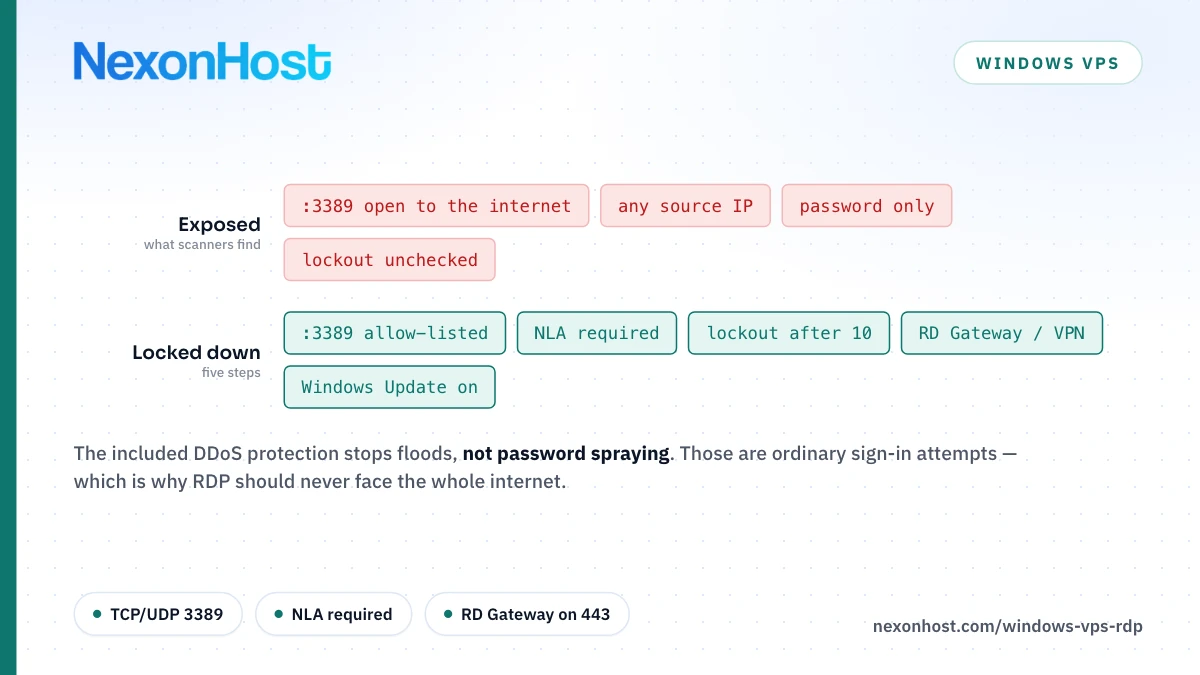
RDP listens on TCP and UDP 3389. CISA's #StopRansomware guide says not to expose RDP to the internet and, where it must be reachable, to lock accounts after repeated failures, use MFA and log sign-in attempts. The UK NCSC adds IP allow-listing and a VPN. On a VPS that means five steps.
1. Allow only your addresses. Scope the built-in Remote Desktop firewall rules to your office or VPN address (203.0.113.10 is a placeholder), and test from it before closing your current session:
Set-NetFirewallRule -DisplayGroup "Remote Desktop" -RemoteAddress 203.0.113.10
Also check that the firewall is on and no other inbound rule opens 3389.
2. Keep Network Level Authentication on. NLA makes users authenticate before a session is created. A value of 1 here means it is required; 0 means it is off:
Get-ItemProperty -Path 'HKLM:\SYSTEM\CurrentControlSet\Control\Terminal Server\WinStations\RDP-Tcp' -Name 'UserAuthentication'
3. Set an account lockout threshold. Check Local Security Policy, Account Lockout Policy: Microsoft's policy reference gives 0, never lock, as the stand-alone server default, and its security baselines suggest 10 failed attempts as a starting point. Since the October 2022 updates, "Allow Administrator account lockout" there extends lockout to the built-in Administrator's network sign-ins, RDP included; enable it, give that account a long, unique password and use a named admin account day to day.
4. Put a gateway or VPN in front. For a team, the RD Gateway role carries RDP inside HTTPS on TCP 443, so 3389 never faces the internet, and, with Active Directory synced to Microsoft Entra ID, it can require Entra multifactor authentication through the NPS extension. For one or two admins, a VPN plus the firewall rule does the job.
5. Patch. BlueKeep (CVE-2019-0708) was a pre-authentication, wormable flaw in Remote Desktop Services, scored 9.8 out of 10 by NVD. It hit Windows 7, Server 2008/2008 R2 and older, not the versions sold here, but Microsoft's advice still holds: NLA only partly mitigated it, and every affected system had to be updated. Leave Windows Update on.
What the included DDoS protection does not stop
Every WIN and UWIN plan includes network DDoS protection rated at 100 Gbps, with upgrades at checkout from 500 Gbps for €149 a month. It works at Layers 3 and 4, against floods aimed at the server. It does not protect against password spraying or brute force on RDP: those are ordinary, low-volume connections that look like real sign-ins, which is what the five steps above are for. Gbps vs Mpps explains why packet rate matters as well as bandwidth.
What else goes on the bill
Monthly-term store prices. Semi-annual billing takes 5% off the plan and annual 10% (WIN1: €237.60 a year, €19.80 a month).
| Add-on | Monthly |
|---|---|
| Licensed Windows Server 2022 | €35 once on a monthly term |
| DDoS upgrade, 500 Gbps to 10 Tbps | €149 to €4,499 |
| Extra transfer on WIN (2 / 10 / 100 TB) | €5 / €15 / €100 |
| Extra IP address (up to 5) | €3 each |
| Management: Basic / Standard / Full | €20 / €50 / €150 |
| Backup storage, 1 TB | €5 |
Ask sales what each management tier covers on Windows before relying on it.
Where to start
A Windows VPS RDP setup from NexonHost starts at €22 a month for WIN1, in Germany or the Netherlands, with a 10 Gbps port and 100 Gbps DDoS protection included; WIN3 at €49.40 is the first plan Microsoft's guidance would size as a shared session host. Compare every plan on the Windows VPS page. Still choosing the platform? Linux VPS vs Windows VPS and Windows VPS vs a dedicated Windows server cover those decisions, and the new server security checklist, written for Linux, covers the patching, backup and monitoring habits that carry over. To test with real users, start on a one-month term.
Prices are as of 12 October 2026 (DDoS tiers 23 October 2026), in EUR excluding VAT. Check the product page and the store for current figures.
Sources
- Microsoft Product Terms — Universal License Terms for all Software: administrative access by two users without CALs, outsourcing on dedicated devices, Flexible Virtualization Benefit. Retrieved 12 October 2026.
- Microsoft Product Terms — Windows Server: RDS CAL also required to host a graphical user interface; licensing by individual virtual OSE (minimum 8 licences per VM, subscription or Software Assurance only); RDS User CAL extended rights. Retrieved 12 October 2026.
- Microsoft Services Provider Use Rights — Windows Server: up to two users per running instance for testing, maintenance and administration without RDS SALs; RDS SAL also required to host a graphical user interface "or other technology"; RDS SAL per user, one SAL per authorised user regardless of actual access, desktops as a service via Windows Server and RDS. Retrieved 12 October 2026.
- Microsoft SPLA program guidance: SPLA licences are monthly subscription licences; a SAL per user or device. Retrieved 12 October 2026.
- Microsoft Windows Server 2025 licensing guidance: licensing by virtual machine, minimum 8 core licences per VM (footnote 1 adds 16 per customer). Retrieved 12 October 2026.
- Microsoft Flexible Virtualization Benefit licensing guidance: own licences on Authorized Outsourcers' shared servers, subscription or Software Assurance required. Retrieved 12 October 2026.
- Microsoft Listed Providers: Alibaba, Amazon, Google and Microsoft (October 2019 list, current version). Retrieved 12 October 2026.
- Microsoft Learn — License Remote Desktop Services with client access licences: per-user and per-device RDS CALs, 120-day grace period. Retrieved 12 October 2026.
- Microsoft Learn — Windows Server 2016 lifecycle and Windows Server 2022 lifecycle: extended support ends January 2027 (2016) and October 2031 (2022). Retrieved 12 October 2026.
- Microsoft Learn — Remote Desktop Protocol bandwidth requirements: Microsoft Excel 150–200 Kbps and graphically rich web browsing 6–6.5 Mbps in default graphics mode, single 1920×1080 monitor. Retrieved 12 October 2026.
- Microsoft Learn — Session host virtual machine sizing guidelines: users per vCPU (6 light, 4 medium, 2 heavy), multi-session minimum 8 vCPU / 16 GB, single-session light 2 vCPU / 8 GB, four cores minimum for a stable multi-session VM. Retrieved 12 October 2026.
- Microsoft Learn — Ports used by Remote Desktop Services: TCP and UDP 3389, RD Gateway on TCP 443. Retrieved 12 October 2026.
- Microsoft Learn — Remote Desktop Services overview: RD Gateway carries RDP over HTTPS without opening internal RDP ports. Retrieved 12 October 2026.
- Microsoft Learn — RD Gateway with the NPS extension and Microsoft Entra ID: multifactor authentication for RD Gateway sign-ins; requires on-premises Active Directory synced with Microsoft Entra ID and an MFA licence. Retrieved 12 October 2026.
- Microsoft Learn — Set-NetFirewallRule: -DisplayGroup and -RemoteAddress parameters and accepted address formats. Retrieved 12 October 2026.
- Microsoft Learn — Remote Desktop can't connect to the remote computer: the "Remote Desktop" firewall display group. Retrieved 12 October 2026.
- Microsoft Learn — Change the Remote Desktop listening port: Get-ItemProperty syntax for the RDP-Tcp registry key. Retrieved 12 October 2026.
- Microsoft Learn — Troubleshoot authentication errors when you use RDP: UserAuthentication 1 enables NLA, 0 disables it. Retrieved 12 October 2026.
- Microsoft Learn — Account lockout threshold: stand-alone server default 0, baseline suggestion of 10. Retrieved 12 October 2026.
- Microsoft Support — KB5020282, account lockout available for built-in local administrators: from the October 11, 2022 cumulative updates (Windows Server 2016–2022 included), the "Allow Administrator account lockout" policy locks the built-in Administrator out of network logons such as RDP. Retrieved 12 October 2026.
- CISA — #StopRansomware Guide: do not expose RDP; close unused RDP ports, account lockout, MFA, log RDP sign-ins. Retrieved 12 October 2026.
- NCSC — Mitigating malware and ransomware attacks: disable RDP if not needed, MFA and IP allow-listing, VPN, patching. Retrieved 12 October 2026.
- Microsoft Security Response Center — Prevent a worm by updating Remote Desktop Services (CVE-2019-0708), 14 May 2019: pre-authentication and wormable, affected versions (Windows 7, Server 2008 and 2008 R2; out of support XP and Server 2003), NLA partial mitigation. Retrieved 12 October 2026.
- NVD — CVE-2019-0708: CVSS 3.1 base score 9.8 (critical). Retrieved 12 October 2026.
- NexonHost store configurator, WIN1–WIN4 and UWIN1–UWIN4: plan prices and specs, operating system options and the €35 setup fee, regions, extra transfer, extra IPs, management tiers, backup storage, billing-term totals. Retrieved 12 October 2026.
- NexonHost store configurator, WIN and UWIN plans: DDoS protection (100 Gbps included; upgrades 500 Gbps €149, 1 Tbps €499, 2 Tbps €999, 5 Tbps €2,499, 10 Tbps with Layer 7 €4,499). Retrieved 23 October 2026.
- Computed: 200 Kbps × 28,800 s × 22 days ÷ 8 = 15.84 GB per user-month; × 25 users = 396 GB; 6.5 Mbps × 28,800 s × 22 ÷ 8 = 514.8 GB per user-month; × 8 = 4,118 GB; 6 / 4 users per vCPU × 8 vCPU = 48 / 32; WIN1 annual €237.60 ÷ 12 = €19.80.