CS2 server hosting means running Valve's server build of Counter-Strike 2 on a machine you control, with a public IP, a Steam token and enough disk for the whole game. This guide works from Valve's own pages: requirements, SteamCMD, the Game Server Login Token and its rules, ports, and which NexonHost plan to start on.
Counter-Strike 2 and Steam are trademarks of Valve Corporation; this post is not affiliated with or endorsed by Valve. You install and run the server yourself.
Counter-Strike 2 server requirements: what Valve publishes
Valve's developer wiki has a Counter-Strike 2 Dedicated Servers page. It is community-edited, flagged for an update, has a stub requirements section and was last edited on 19 August 2026, so treat its figures as a floor:
- Disk: 65 GB of storage; the download alone is about 60 GB.
- Memory: 2 GB of RAM minimum.
- CPU: x86-64-v2, with POPCNT and SSE4.2 named.
- Operating system: Windows 10/11, or Linux with glibc 2.31, which the page says means at least Ubuntu 20.04, Debian 11 or Enterprise Linux 9.
On NexonHost's OS menu, the glibc floor rules out Ubuntu 18.04, Debian 9 and 10, and AlmaLinux, Rocky or Oracle 8; Ubuntu 24.04 or Debian 12 are fine. VPS spec sheets don't name a CPU model, so check the page's two flags; both words should print:
grep -o -w -E 'popcnt|sse4_2' /proc/cpuinfo | sort -u
Install with SteamCMD, as its own user
Valve merged the game client and the cs2 dedicated server into app ID 730 (CS:GO's server was app 740), so you install the full game with SteamCMD, Valve's command-line Steam client. Its page warns against running it as root and suggests a separate steam user. On Ubuntu it comes from the multiverse repository, with 32-bit packages enabled:
sudo add-apt-repository multiverse
sudo dpkg --add-architecture i386
sudo apt update
sudo apt install steamcmd
sudo useradd -m steam
sudo -iu steam
Then, as steam, install the server:
steamcmd +force_install_dir /home/steam/cs2-ds +login anonymous +app_update 730 validate +quit
Notes from Valve's two pages:
- Anonymous login works; set the install directory first.
- Keep the path lower-case: on some Linux distributions it cannot contain capital letters.
- Run it again after every game update. Leave out
validatefor routine updates: it overwrites any shipped file you have changed. - If the server reports "Failed to load module" naming
steamclient.so, the CS2 page's fix is a symlink from SteamCMD'slinux64/steamclient.sointo~/.steam/sdk64/.
The Game Server Login Token
Other players can only join if the server has a Game Server Login Token (GSLT). Create one on Steam's game server account page using 730 as the app ID, then pass it at launch with +sv_setsteamaccount.
Steam's page lists the account requirements: not community banned, locked or limited; a qualifying registered phone; and owning the game. One account may create up to 1,000 tokens. The same page says:
- You are responsible for your tokens; if one is banned, you may be restricted from playing the game.
- "Do not distribute game server login tokens to third parties."
- Long-unused tokens expire and can be regenerated; a Steam password reset regenerates all of them.
If the server can't connect to Steam with result 18 or 106, Valve's SRCDS page says to regenerate or replace the token.
What Valve bans on community servers
Steam Support's CS2 GSLT Bans article sets the main rule. GSLT bans go to operators whose mods report false inventories or profiles; the account is then permanently barred from running CS2 community servers, with a matchmaking cooldown that blocks competitive matches and trading.
Valve asks servers to disable:
- anything that lets players temporarily claim CS2 items they don't own, such as weapon skins or knives, even if only that player sees them;
- falsified skill groups, profile ranks or Operation coins;
- anything that interferes with a player's access to their inventory, items or profile.
Allowed, per the same article: stock weapons and grenades from a gun menu, scoreboard score or name mods, and knife-drop or remove-weapon mods that grant nothing a player doesn't own. Read it in full before installing plugins.
Ports, launch command and firewall
From the game folder of the install, Valve's Linux start uses the cs2.sh script:
cd /home/steam/cs2-ds/game
./cs2.sh -dedicated -port 27015 -maxplayers 10 +game_alias competitive +map de_dust2 +sv_setsteamaccount YOUR_TOKEN
Without -dedicated it launches the game. game_alias sets type and mode together: competitive (the default), wingman, casual, deathmatch or custom.
For ports, the CS2 page points to Valve's general SRCDS page, written for Source 1 games, not CS2:
- 27015 TCP/UDP: game traffic, pings and RCON, changed with
-port; Steam Support's ports list gives UDP for gameplay, TCP for RCON. - 27020 UDP: SourceTV, changed with
+tv_port; Valve's 2023 CS2 cvar list hastv_enableoff by default. - 27005 UDP (client port) and 26900 UDP (Steam, outgoing).
A ufw baseline: SSH allowed before enabling, players on UDP 27015, and TCP 27015 (RCON) only from your admin address (replace 203.0.113.10, a documentation address):
sudo ufw default deny incoming
sudo ufw default allow outgoing
sudo ufw allow 22/tcp
sudo ufw allow 27015/udp
sudo ufw allow from 203.0.113.10 to any port 27015 proto tcp
sudo ufw enable
Open 27020/udp only if you turn SourceTV on. Then test a join from outside your admin network. If you use RCON, set a long, random rcon_password. Keys, patching and backups are in the new server security checklist.
Sizing: start on a plan, then measure
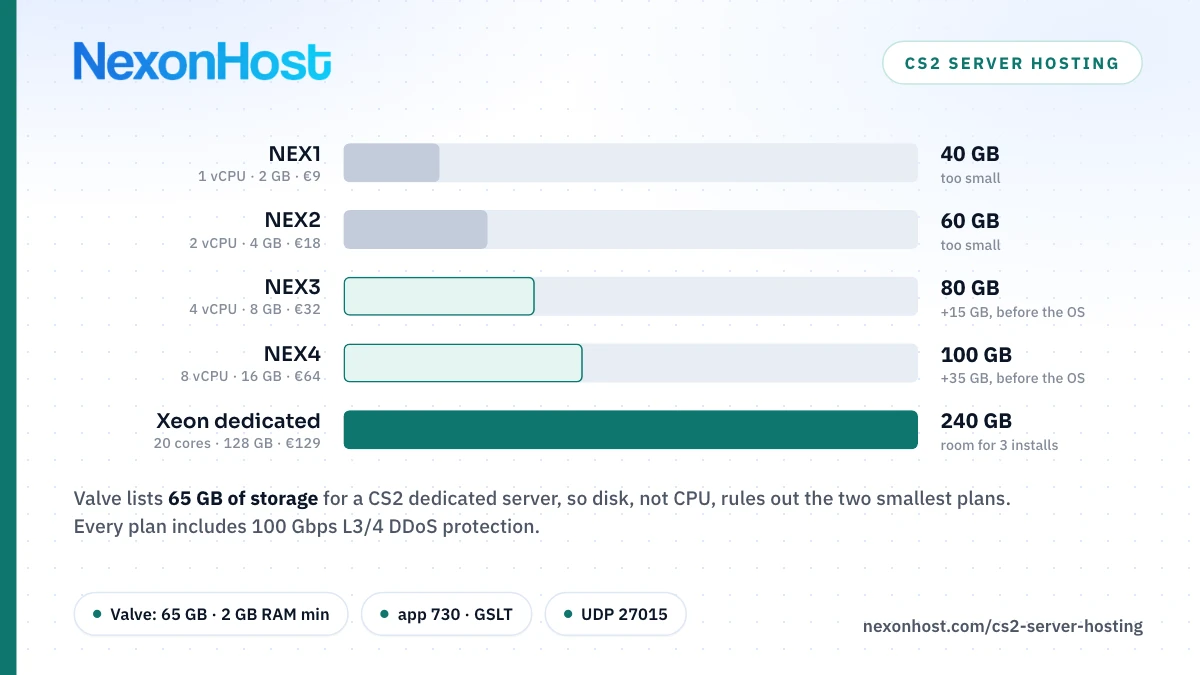
Beyond 2 GB of RAM, 65 GB of disk and a CPU feature level, Valve publishes no CS2 sizing: no CPU or RAM per player, no bandwidth per slot. Nor is tick rate a shortcut: counter-strike.net says that with sub-tick updates, tick rate "no longer matters for moving, shooting, or throwing".
| Plan | vCPU / RAM / SSD / traffic | A month | Start here? |
|---|---|---|---|
| NEX1 | 1 / 2 GB / 40 GB / 4 TB | €9 | No: under 65 GB |
| NEX2 | 2 / 4 GB / 60 GB / 8 TB | €18 | No: under 65 GB |
| NEX3 | 4 / 8 GB / 80 GB / 16 TB | €32 | One server; measure |
| NEX4 | 8 / 16 GB / 100 GB / 32 TB | €64 | More disk spare; measure |
| UNEX3 | 4 / 8 GB / 80 GB / unmetered, 1 Gbps | €54 | Only if 16 TB runs short |
| Xeon dedicated | 20 cores / 128 GB / 240 GB / unmetered, 1 Gbps | €129 | Several servers |
Disk left after the 65 GB, before the OS: 80 − 65 = 15 GB on NEX3, 100 − 65 = 35 GB on NEX4. On the Xeon, 240 ÷ 65 = 3.7, so three separate installs fit; 2× 500 GB SSD is €10 a month more.
Measure during a full match: Valve's 2023 cvar list has sv_hibernate_when_empty on by default, so an empty server barely uses CPU. Watch per-core load in top (press 1), memory in free -m and traffic in vnstat -l; the server's status command prints connection status. NEX3's 16 TB is 49.4 Mbit/s averaged over 30 days (16 × 10¹² × 8 ÷ 2,592,000 seconds); compare your evening peak before paying €22 more for UNEX3.
DDoS protected CS2 hosting
Game traffic and server queries arrive on UDP 27015. NexonHost's website DDoS proxy is HTTP(S) only and cannot carry that; game server DDoS protection explains why, and covers query floods and Valve's A2S challenge. So DDoS protected CS2 hosting means filtering in front of the server's own address.
Every NexonHost VPS and dedicated server includes 100 Gbps of Layer 3/4 protection. The DDoS protected server page says floods are dropped upstream, before they reach your port; that the included tier covers UDP, ICMP and amplification floods, SYN floods and connection exhaustion; and that protection is active from the moment the server is online. Paid tiers run from 500 Gbps (€149 a month) to 10 Tbps (€4,499).
Ask three things first:
- Packet rate. Game-port floods often use small packets, and NexonHost publishes no packet-rate figure; see Gbps vs Mpps.
- Your port. NEX plans have 10 Gbps and UNEX 1 Gbps behind the same 100 Gbps tier; VPS DDoS protection covers that ratio and what to ask about traffic quotas.
- Above the tier. What happens then is not published; ask through the contact page before match night.
Where to host it
Put the server near your players. NexonHost VPS run in Germany, the Netherlands and Romania; dedicated servers in 12 cities (Amsterdam, Frankfurt, Bucharest, Vienna, Sofia, Paris, Marseille, Dublin, Milan, Warsaw, Madrid and Ashburn), with the same price and DDoS ladder in each. Game server location computes distance floors from player hubs to each city.
CS2 server hosting at NexonHost
For CS2 server hosting with one server, start on NEX3 from the Linux VPS range: 4 vCPU, 8 GB of RAM, 80 GB of SSD and 16 TB of traffic on a 10 Gbps port, €32 a month. NEX4 at €64 leaves 35 GB of disk spare. For several servers, a dedicated server from €129 a month has 20 cores, 128 GB of RAM and 240 GB of SSD. All include 100 Gbps of Layer 3/4 DDoS protection.
What it doesn't solve: installing, updating after every CS2 patch and keeping plugins inside Valve's rules stay with you. Start on a one-month term, measure a full match, then switch to annual billing (10% off, €28.80 a month for NEX3).
Prices as of 23 November 2026, EUR excluding VAT, a month; the store preselects a 1 TB backup add-on at €5 a month extra. Check the product page before ordering.
Sources
- Valve Developer Community — Counter-Strike 2 Dedicated Servers: 65 GB storage, ~60 GB download, 2 GB RAM minimum, x86-64-v2 (POPCNT/SSE4.2), Windows 10/11 or Linux glibc 2.31 (Ubuntu 20.04, Debian 11, EL 9), app ID 730 (formerly 740), SteamCMD steps, lower-case path bug, GSLT with app ID 730 and +sv_setsteamaccount, cs2.sh -dedicated, -port, -maxplayers, game_alias, competitive default, steamclient.so symlink. Community-edited wiki on Valve's site, last edited 19 August 2026; the live page served a bot check, so it was read from the Internet Archive copy of 11 September 2026, retrieved 23 November 2026
- Valve Developer Community — Source Dedicated Server: ports 27015 TCP/UDP (game, pings, RCON, -port), 27020 UDP (SourceTV, +tv_port), 27005 UDP (client), 26900 UDP (Steam, outgoing); token errors 18/106. Written for Source 1 games; the article does not mention CS2. Last edited 26 June 2026; the live page served a bot check, so it was read from the Internet Archive copy of 5 August 2026, retrieved 23 November 2026
- Steam Support — Required Ports for Steam: dedicated or listen servers use TCP 27015 (default) for the SRCDS RCON port and UDP 27015 (default) for gameplay traffic (article timestamp 19 February 2026), retrieved 23 November 2026
- Valve Developer Community — SteamCMD: separate steam user, do not run as root, Ubuntu multiverse + i386 package, login anonymous, set install dir before login, command-line form with +app_update 730, validate overwrites changed files. Last edited 25 July 2026, read from the Internet Archive copy of 20 November 2026, retrieved 23 November 2026
- Valve Developer Community — List of Counter-Strike 2 console commands and variables (build 9832, October 2023): hostport 27015, tv_port 27020, tv_enable false, rcon_password, status, sv_hibernate_when_empty true. Last edited 5 December 2025; read from the Internet Archive copy of 31 October 2026, retrieved 23 November 2026
- Steam — Game Server Account Management: account requirements, up to 1,000 game server accounts, do not distribute tokens, expiry and regeneration, retrieved 23 November 2026
- Steam Support — CS2 - GSLT Bans: what gets a GSLT ban, permanent operator ban and matchmaking cooldown, what not to offer, what is allowed (article dated 1 November 2023), retrieved 23 November 2026
- Counter-Strike 2 — official site, "Introducing Counter-Strike 2" page from the 2023 Limited Test, sub-tick updates: tick rate no longer matters for moving, shooting, or throwing, retrieved 23 November 2026
- vnStat man page — -l/--live shows the current transfer rate, retrieved 23 November 2026
- NexonHost — DDoS protected dedicated servers: included tier covers UDP, ICMP and amplification floods, SYN floods and connection exhaustion; dropped upstream before your port; active from the moment the server is online, retrieved 23 November 2026
- NexonHost store — NEX, UNEX and Xeon plans, ports, disk options, DDoS tiers, annual discount and backup add-on, retrieved 23 November 2026
- Computed — 80 − 65 = 15 GB; 100 − 65 = 35 GB; 240 ÷ 65 = 3.7; 30 × 86,400 = 2,592,000 s; 16 × 10¹² × 8 ÷ 2,592,000 = 49.4 Mbit/s; €54 − €32 = €22