


CentOS 8 : upgrade to latest linux kernel
Update CentOS 8 Software Packages:
Connect with centos-8.centlinux.com server as root user by using a SSH tool.
Upgrade existing software packages in CentOS 8 machine by using the dnf command.
[root@centos-8 ~]# dnf update -y
Last metadata expiration check: 0:02:03 ago on Sun 05 Jul 2020 12:20:54 AM PKT.
Dependencies resolved.
=============================================================================
Package Arch Version Repo Size
=============================================================================
Upgrading:
gnutls x86_64 3.6.8-11.el8_2 BaseOS 915 k
libnghttp2 x86_64 1.33.0-3.el8_2.1 BaseOS 77 k
microcode_ctl x86_64 4:20191115-4.20200609.1.el8_2 BaseOS 2.7 M
Transaction Summary
=============================================================================
Upgrade 3 Packages
Total download size: 3.7 M
Downloading Packages:
(1/3): libnghttp2-1.33.0-3.el8_2.1.x86_64.rp 55 kB/s | 77 kB 00:01
(2/3): gnutls-3.6.8-11.el8_2.x86_64.rpm 96 kB/s | 915 kB 00:09
(3/3): microcode_ctl-20191115-4.20200609.1.e 204 kB/s | 2.7 MB 00:13
—————————————————————————–
Total 230 kB/s | 3.7 MB 00:16
Running transaction check
Transaction check succeeded.
Running transaction test
Transaction test succeeded.
Running transaction
Preparing : 1/1
Running scriptlet: microcode_ctl-4:20191115-4.20200609.1.el8_2.x86_6 1/1
Upgrading : microcode_ctl-4:20191115-4.20200609.1.el8_2.x86_6 1/6
Running scriptlet: microcode_ctl-4:20191115-4.20200609.1.el8_2.x86_6 1/6
Upgrading : libnghttp2-1.33.0-3.el8_2.1.x86_64 2/6
Upgrading : gnutls-3.6.8-11.el8_2.x86_64 3/6
Running scriptlet: microcode_ctl-4:20191115-4.20200602.2.el8_2.x86_6 4/6
Cleanup : microcode_ctl-4:20191115-4.20200602.2.el8_2.x86_6 4/6
Running scriptlet: microcode_ctl-4:20191115-4.20200602.2.el8_2.x86_6 4/6
Cleanup : libnghttp2-1.33.0-1.el8_0.1.x86_64 5/6
Cleanup : gnutls-3.6.8-10.el8_2.x86_64 6/6
Running scriptlet: microcode_ctl-4:20191115-4.20200609.1.el8_2.x86_6 6/6
Running scriptlet: gnutls-3.6.8-10.el8_2.x86_64 6/6
Verifying : gnutls-3.6.8-11.el8_2.x86_64 1/6
Verifying : gnutls-3.6.8-10.el8_2.x86_64 2/6
Verifying : libnghttp2-1.33.0-3.el8_2.1.x86_64 3/6
Verifying : libnghttp2-1.33.0-1.el8_0.1.x86_64 4/6
Verifying : microcode_ctl-4:20191115-4.20200609.1.el8_2.x86_6 5/6
Verifying : microcode_ctl-4:20191115-4.20200602.2.el8_2.x86_6 6/6
Upgraded:
gnutls-3.6.8-11.el8_2.x86_64
libnghttp2-1.33.0-3.el8_2.1.x86_64
microcode_ctl-4:20191115-4.20200609.1.el8_2.x86_64
Complete!
Verify the Kernel version of CentOS 8 operating system.
[root@centos-8 ~]# uname -r
4.18.0-193.6.3.el8_2.x86_64
Install ELRepo yum repository on CentOS 8:
The latest Linux kernels are available through ELRepo yum repository. Therefore, we are installing the ELRepo repository using following dnf command.
[root@centos-8 ~]# dnf install -y https://www.elrepo.org/elrepo-release-8.el8.elrepo.noarch.rpm
Last metadata expiration check: 0:02:29 ago on Sun 05 Jul 2020 12:28:31 AM PKT.
elrepo-release-8.el8.elrepo.noarch.rpm 10 kB/s | 13 kB 00:01
Dependencies resolved.
=============================================================================
Package Arch Version Repository Size
=============================================================================
Installing:
elrepo-release noarch 8.2-1.el8.elrepo @commandline 13 k
Transaction Summary
=============================================================================
Install 1 Package
Total size: 13 k
Installed size: 5.0 k
Downloading Packages:
Running transaction check
Transaction check succeeded.
Running transaction test
Transaction test succeeded.
Running transaction
Preparing : 1/1
Installing : elrepo-release-8.2-1.el8.elrepo.noarch 1/1
Verifying : elrepo-release-8.2-1.el8.elrepo.noarch 1/1
Installed:
elrepo-release-8.2-1.el8.elrepo.noarch
Complete!
Import the GPG Key of ELRepo repository into the system.
[root@centos-8 ~]# rpm –import https://www.elrepo.org/RPM-GPG-KEY-elrepo.org
Build cache for newly installed yum repositories.
[root@centos-8 ~]# dnf makecache
CentOS-8 – AppStream 5.6 kB/s | 4.3 kB 00:00
CentOS-8 – Base 10 kB/s | 3.9 kB 00:00
CentOS-8 – Extras 785 B/s | 1.5 kB 00:01
ELRepo.org Community Enterprise Linux Reposi 2.9 kB/s | 2.9 kB 00:01
Metadata cache created.
Install Latest Linux Kernel on CentOS 8:
ELRepo repository contains elrepo-kernel channel that provides the Long Term Supported kernels (kernel-lt) and Main-Line Stable Kernels (kernel-ml) for Red Hat Enterprise Linux based distributions. Both of these Kernel packages are built from the sources available from The Linux Kernel Archives.
Currently, there isn’t any Long Term Supported kernel is available in this channel. But the Main-Line kernel based on latest stable release of Linux Kernel 5.7 is available.
Search the elrepo-kernel channel to list down the kernel-ml related packages.
[root@centos-8 ~]# dnf –disablerepo=”*” –enablerepo=”elrepo-kernel” list available | grep kernel-ml
kernel-ml.x86_64 5.7.7-1.el8.elrepo elrepo-kernel
kernel-ml-core.x86_64 5.7.7-1.el8.elrepo elrepo-kernel
kernel-ml-devel.x86_64 5.7.7-1.el8.elrepo elrepo-kernel
kernel-ml-doc.noarch 5.7.7-1.el8.elrepo elrepo-kernel
kernel-ml-headers.x86_64 5.7.7-1.el8.elrepo elrepo-kernel
kernel-ml-modules.x86_64 5.7.7-1.el8.elrepo elrepo-kernel
kernel-ml-modules-extra.x86_64 5.7.7-1.el8.elrepo elrepo-kernel
kernel-ml-tools.x86_64 5.7.7-1.el8.elrepo elrepo-kernel
kernel-ml-tools-libs.x86_64 5.7.7-1.el8.elrepo elrepo-kernel
kernel-ml-tools-libs-devel.x86_64 5.7.7-1.el8.elrepo elrepo-kernel
Install the kernel-ml package by using the following command. You can also install any other kernel-ml-* package according to your requirement.
[root@centos-8 ~]# dnf –enablerepo=”elrepo-kernel” install -y kernel-ml
Last metadata expiration check: 0:05:46 ago on Sun 05 Jul 2020 12:33:14 AM PKT.
Dependencies resolved.
================================================================================
Package Arch Version Repository Size
================================================================================
Installing:
kernel-ml x86_64 5.7.7-1.el8.elrepo elrepo-kernel 32 k
Installing dependencies:
kernel-ml-core x86_64 5.7.7-1.el8.elrepo elrepo-kernel 28 M
kernel-ml-modules x86_64 5.7.7-1.el8.elrepo elrepo-kernel 23 M
Transaction Summary
================================================================================
Install 3 Packages
Total download size: 51 M
Installed size: 87 M
Downloading Packages:
(1/3): kernel-ml-5.7.7-1.el8.elrepo.x86_64.rpm 51 kB/s | 32 kB 00:00
(2/3): kernel-ml-modules-5.7.7-1.el8.elrepo.x86 115 kB/s | 23 MB 03:24
(3/3): kernel-ml-core-5.7.7-1.el8.elrepo.x86_64 109 kB/s | 28 MB 04:25
——————————————————————————–
Total 196 kB/s | 51 MB 04:28
Running transaction check
Transaction check succeeded.
Running transaction test
Transaction test succeeded.
Running transaction
Preparing : 1/1
Installing : kernel-ml-core-5.7.7-1.el8.elrepo.x86_64 1/3
Running scriptlet: kernel-ml-core-5.7.7-1.el8.elrepo.x86_64 1/3
Installing : kernel-ml-modules-5.7.7-1.el8.elrepo.x86_64 2/3
Running scriptlet: kernel-ml-modules-5.7.7-1.el8.elrepo.x86_64 2/3
Installing : kernel-ml-5.7.7-1.el8.elrepo.x86_64 3/3
Running scriptlet: kernel-ml-core-5.7.7-1.el8.elrepo.x86_64 3/3
Running scriptlet: kernel-ml-5.7.7-1.el8.elrepo.x86_64 3/3
Verifying : kernel-ml-modules-5.7.7-1.el8.elrepo.x86_64 1/3
Verifying : kernel-ml-core-5.7.7-1.el8.elrepo.x86_64 2/3
Verifying : kernel-ml-5.7.7-1.el8.elrepo.x86_64 3/3
Installed:
kernel-ml-5.7.7-1.el8.elrepo.x86_64
kernel-ml-core-5.7.7-1.el8.elrepo.x86_64
kernel-ml-modules-5.7.7-1.el8.elrepo.x86_64
Complete!
Linux Kernel 5.7 has been installed on our CentOS 8 server.
To load the new Linux kernel we need to restart the CentOS 8 machine.
[root@centos-8 ~]# systemctl reboot
After reboot, the newly installed Linux Kernel 5.7 has been added to the GRUB boot menu.
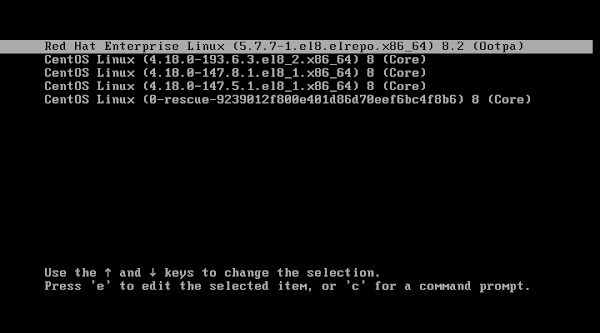
Do not confuse with the long list of kernels in following screenshot. It is because, we have experimented with the different versions of Linux kernels. In your case, there will be only two boot menu entries.
Start the CentOS 8 operating system with Linux Kernel 5.7.
After CentOS 8 startup, execute the following command at Linux CLI to verify the active Kernel version.
[root@centos-8 ~]# uname -r
5.7.7-1.el8.elrepo.x86_64
We have successfully upgraded to Latest Linux Kernel i.e. 5.7 on CentOS 8.
Uninstall Linux Kernel 5.7 on CentOS 8:
Uninstall process of Linux Kernel 5.7 is very straight forward, But we have included it in this article for the sake of completeness.
Restart your CentOS 8 machine.
[root@centos-8 ~]# systemctl reboot
Start the Linux operating system with a previous version of Linux Kernel.
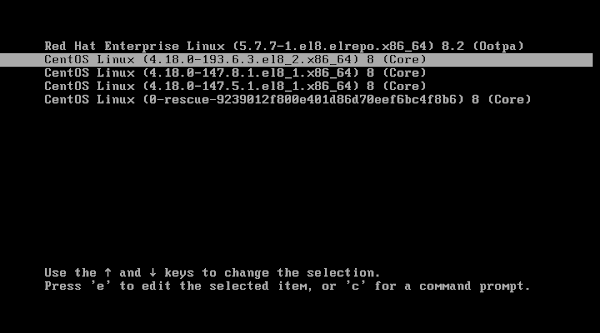
After successful startup, verify the active kernel version by executing the following command at Linux CLI.
[root@centos-8 ~]# uname -r
4.18.0-193.6.3.el8_2.x86_64
Our CentOS 8 operating system is now using our previous Linux kernel.
Use dnf command to uninstall Linux Kernel 5.7 as follows.
[root@centos-8 ~]# dnf remove -y kernel-ml
Dependencies resolved.
================================================================================
Package Arch Version Repository Size
================================================================================
Removing:
kernel-ml x86_64 5.7.7-1.el8.elrepo @elrepo-kernel 0
Removing unused dependencies:
kernel-ml-core x86_64 5.7.7-1.el8.elrepo @elrepo-kernel 64 M
kernel-ml-modules x86_64 5.7.7-1.el8.elrepo @elrepo-kernel 23 M
Transaction Summary
================================================================================
Remove 3 Packages
Freed space: 87 M
Running transaction check
Transaction check succeeded.
Running transaction test
Transaction test succeeded.
Running transaction
Preparing : 1/1
Erasing : kernel-ml-5.7.7-1.el8.elrepo.x86_64 1/3
Erasing : kernel-ml-modules-5.7.7-1.el8.elrepo.x86_64 2/3
Running scriptlet: kernel-ml-modules-5.7.7-1.el8.elrepo.x86_64 2/3
Running scriptlet: kernel-ml-core-5.7.7-1.el8.elrepo.x86_64 3/3
Erasing : kernel-ml-core-5.7.7-1.el8.elrepo.x86_64 3/3
Running scriptlet: kernel-ml-core-5.7.7-1.el8.elrepo.x86_64 3/3
Verifying : kernel-ml-5.7.7-1.el8.elrepo.x86_64 1/3
Verifying : kernel-ml-core-5.7.7-1.el8.elrepo.x86_64 2/3
Verifying : kernel-ml-modules-5.7.7-1.el8.elrepo.x86_64 3/3
Removed:
kernel-ml-5.7.7-1.el8.elrepo.x86_64
kernel-ml-core-5.7.7-1.el8.elrepo.x86_64
kernel-ml-modules-5.7.7-1.el8.elrepo.x86_64
Complete!
Restart the CentOS 8 machine again.
[root@centos-8 ~]# systemctl reboot
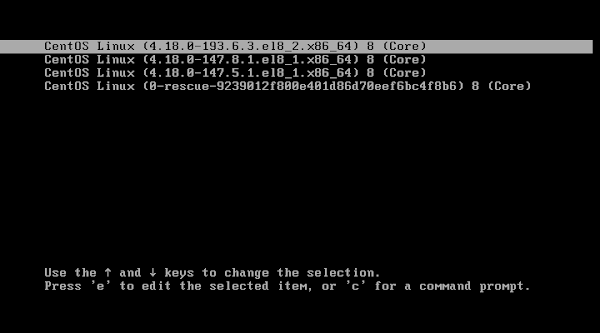
You can see that the Linux Kernel 5.7 has been removed from the GRUB boot menu. Linux Kernel 5.7 has been uninstalled now.
